
What is a Microsoft 365 tenant-to-tenant migration, and who actually does this kind of work? In simple terms, it is the process of moving mailboxes, files, and Teams data from one Microsoft 365 environment to another, most commonly because two businesses are merging, one company is splitting off from another, or a growing organisation needs to consolidate multiple tenants into one.
This guide covers what tenant-to-tenant migration actually involves, when a business needs one, what the process looks like from start to finish, who does this kind of work in Australia, and the practical questions that come up along the way, including cost, common mistakes, and what happens to your emails and files during the move.
Key Takeaways Microsoft 365 Tenant-to-Tenant Migration
- A tenant-to-tenant migration moves a business from one Microsoft 365 environment to another. It is different from a simple software upgrade, since it involves recreating identities, permissions, and data in a brand new environment rather than updating an existing one.
- The most common triggers are mergers and acquisitions, divestitures, company rebrands, and consolidating multiple tenants after a period of growth or previous acquisitions.
- The process typically involves pre-migration assessment, target tenant setup, identity and domain preparation, workload migration (mailboxes, OneDrive, Teams, SharePoint), testing, cutover, and post-migration validation.
- Not every provider who sells Microsoft 365 licences actually does migration work well. Look for a provider with specific experience in tenant-to-tenant projects, not just general Microsoft 365 setup and support.
- Cost varies widely depending on mailbox count, data volume, and which workloads need to move, but Australian pricing generally falls somewhere between AU$50 and AU$225 per mailbox for smaller, straightforward migrations, with more complex, larger environments priced differently again.
Quick Answer Microsoft 365 Tenant-to-Tenant Migration
A Microsoft 365 tenant-to-tenant migration moves a business’s mailboxes, OneDrive files, Teams data, and SharePoint sites from one Microsoft 365 tenant to another. It is most commonly needed after a merger or acquisition, a company divestiture, a rebrand, or when a business needs to consolidate multiple existing tenants into one.
For most Brisbane, Gold Coast, and Sunshine Coast SMBs, this kind of work is best handled by a managed IT provider with genuine tenant-to-tenant migration experience rather than attempted internally, since the risk of data loss, broken permissions, and extended downtime is high when it is done without proper planning.
XCD IT provides tenant-to-tenant migration as part of its broader Microsoft 365 and managed IT services for SMBs across South East Queensland.
What Is a Microsoft 365 Tenant-to-Tenant Migration?
A Microsoft 365 tenant is the entire environment a business operates within Microsoft’s cloud, including its domain, user accounts, mailboxes, Teams, SharePoint sites, and security settings. A tenant-to-tenant migration means moving all of that, or a defined portion of it, from one tenant to another.
This is a fundamentally different exercise to upgrading licences or adding new features within an existing tenant.
A tenant-to-tenant migration usually means recreating user identities in a new environment, migrating years of email history and files, rebuilding Teams and SharePoint structures, and making sure nothing breaks for staff who are simply trying to do their jobs while it all happens in the background.
It is also different from migrating to Microsoft 365 for the first time from a different platform, such as Google Workspace. Both source and destination in a tenant-to-tenant migration are already Microsoft 365 environments, which helps in some ways (the underlying platform is the same) and complicates things in others (some workloads, like Teams chat history, are notoriously difficult to move cleanly between tenants).
When Do Businesses Need a Tenant-to-Tenant Migration?
There are a handful of common business situations that trigger this kind of project.
Mergers and acquisitions
When one company acquires another, or two businesses merge, there are usually two separate Microsoft 365 tenants that need to become one. This is the single most common reason businesses go through a tenant-to-tenant migration, and it is covered in more detail further down this guide.
Divestitures
When a business unit or subsidiary is sold off or spun out as its own company, it typically needs to be moved out of the parent company’s tenant into its own, clean environment. This is effectively a migration in reverse, separating data rather than combining it, but it carries many of the same technical challenges.
Rebranding
A significant company rebrand, particularly one involving a new domain name, sometimes prompts a business to move into a freshly configured tenant rather than simply renaming domains within the existing one.
This is less common than the merger or divestiture scenario, but it does happen, especially where the existing tenant has accumulated years of misconfiguration or technical debt that a business wants a clean start from.
Consolidating multiple tenants after growth
Businesses that have grown through multiple acquisitions over time sometimes end up running several separate Microsoft 365 tenants, one per acquired company, with no central management or consistent security policy across them.
Consolidating these into a single, well governed tenant is a common project for businesses at this stage, and it is also one of the more complex versions of tenant-to-tenant migration, since it usually involves several source tenants moving into one target rather than a simple one-to-one move.
What Does the Tenant-to-Tenant Migration Process Actually Involve?
At a high level, most tenant-to-tenant migrations follow a similar structure, regardless of which specific tools or provider are involved.
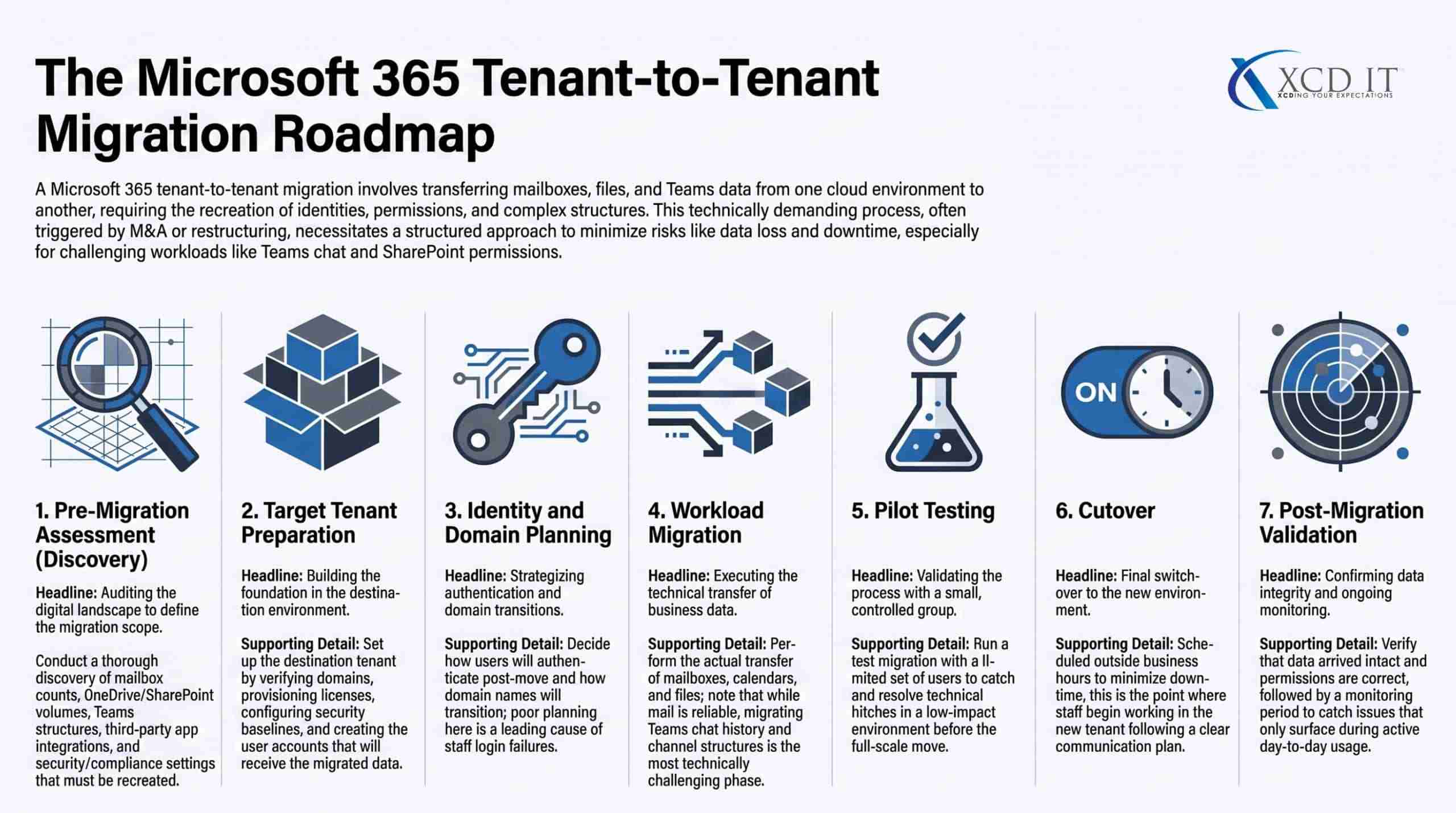
Pre-migration assessment
This is the discovery phase, understanding exactly what needs to move. That includes mailbox counts and sizes, OneDrive and SharePoint data volumes, Teams structures and chat history, third party app integrations, security and compliance settings, and any custom configurations that need to be recreated in the new environment.
Target tenant preparation
The destination tenant needs to be properly set up before any data moves. This includes domain verification, licence provisioning, security baseline configuration, and creating the user accounts that source mailboxes will eventually migrate into.
Identity and domain planning
A decision needs to be made about how users will authenticate after the move, and how domain names will transition from the source tenant to the target. This step, done poorly, is one of the most common causes of post-migration login problems for staff.
Workload migration
This is the actual data movement, mailboxes, calendars, contacts, OneDrive files, SharePoint sites, and Teams data. Different workloads carry different levels of complexity. Mailbox migration is generally the most mature and reliable process. Teams migration, including chat history and channel structures, tends to be the most technically challenging.
Testing Microsoft 365 Tenant-to-Tenant Migration
A responsible migration includes a pilot or test migration with a small group of users before the full cutover, to catch problems while the impact is still small and contained.
Cutover Microsoft 365 Tenant-to-Tenant Migration
The point where users actually start working in the new tenant. This is usually scheduled outside business hours or over a weekend to minimise disruption, and it typically involves a communication plan so staff know what to expect and what might look different.
Post-migration validation
Confirming that data has actually arrived intact, permissions are correctly configured, and nothing critical was missed, followed by a period of monitoring to catch any issues that only surface once people are back to using the new environment day to day.
Who Does Tenant-to-Tenant Migration Work?
Not every business that sells Microsoft 365 licences or provides general IT support has deep experience with tenant-to-tenant migration specifically. It is a specialised type of project, and the options generally fall into a few categories.
Microsoft’s own tools
Microsoft provides some native tooling for cross-tenant migration, but it is limited in scope, generally better suited to simpler migrations, and does not cover every workload well, particularly Teams and some SharePoint scenarios.
Larger or more complex migrations usually need third party tooling on top of what Microsoft provides natively.
Specialist migration tool vendors
Companies that build dedicated tenant-to-tenant migration software. These tools are usually licensed on a per-mailbox or per-user basis and provide much more capability than Microsoft’s native tools, but they still need someone with the right expertise to plan and run the actual project.
Large enterprise consultancies
For very large or highly complex migrations, particularly in the context of a major merger or acquisition, large consulting firms sometimes run these projects. Pricing is typically billed on a day rate basis across technology consultants, migration engineers, and project management roles.
Managed IT providers
For most small and medium businesses, a managed IT provider with genuine tenant-to-tenant migration experience is the most practical option. This is particularly true when the migration is connected to a broader Microsoft 365 or cybersecurity strategy. The same team handling day to day IT support can also manage the migration and everything that comes after it, rather than bringing in a separate specialist with no ongoing relationship to the business.
XCD IT falls into this last category, providing tenant-to-tenant migration as part of its broader managed IT and Microsoft 365 services for SMBs across Brisbane, Gold Coast, and Sunshine Coast.
Do You Need to Hire a Consultant for Your Microsoft 365 Migration?
Not every migration needs outside help, but the honest answer for most businesses is that it depends heavily on scale and complexity, not just headcount.
A very small business with a handful of mailboxes, minimal SharePoint structure, and no complex Teams setup can sometimes manage a straightforward migration internally, particularly with Microsoft’s own documentation and tooling.
The risk in these smaller cases is generally lower simply because there is less to get wrong and less business impact if something does.
The calculation changes quickly once a business has more than a handful of users, meaningful data volumes in OneDrive or SharePoint, active Teams usage with ongoing chat history that matters, or any compliance obligations around data retention.
At that point, the risk of data loss, broken permissions, or extended downtime rises substantially, and the cost of getting it wrong (lost productivity, lost data, frustrated staff) usually outweighs whatever was saved by not hiring a specialist.
A reasonable rule of thumb applies here. If your business cannot afford for email, files, or Teams to be unavailable or incomplete for more than a few hours, or if the migration involves more than roughly twenty to thirty users, it is worth engaging a provider with specific tenant-to-tenant migration experience.
Treating it as just another internal IT project alongside everything else tends to underestimate how much can go wrong.
How Much Does a Tenant-to-Tenant Migration Cost in Australia?
Pricing for tenant-to-tenant migration varies considerably depending on scope, and it is priced differently by different types of providers.
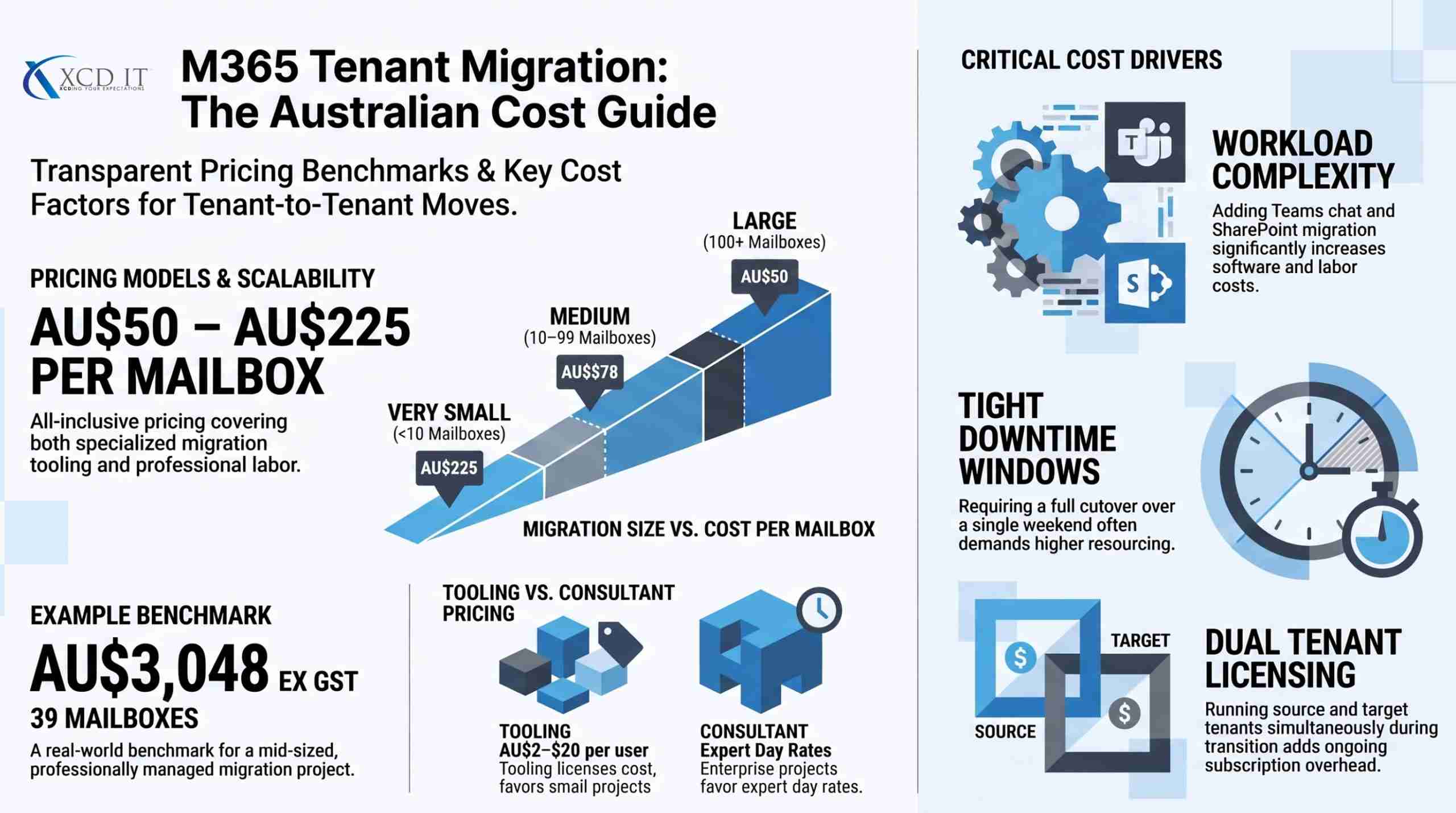
Per-mailbox, all-inclusive pricing
Some Australian providers price migration on a simple per-mailbox basis that includes both the tooling and the labour to run the project.
As a real world reference point, one Australian IT provider publishes tiered pricing that runs from roughly AU$225 per mailbox for very small migrations (under 10 mailboxes) down to around AU$50 per mailbox for larger migrations (100 or more mailboxes), with a documented example of a 39 mailbox migration costing AU$3,048 ex GST in total.
Generally speaking, per-mailbox pricing for straightforward migrations in Australia tends to fall somewhere between AU$50 and AU$225 per mailbox, with the exact number depending heavily on volume and complexity.
Tooling costs alone
If a business only needs the migration software licence and plans to run the project with internal or existing IT resources, third party migration tools are typically licensed somewhere between AU$2 and AU$20 per mailbox depending on which workloads are included.
Mailbox, calendar, and contact migration tends to sit at the lower end of that range. Adding OneDrive and SharePoint migration typically adds a few dollars per user on top. Including Teams chat history and channel migration is usually the most expensive addition, and can meaningfully increase the total tooling cost since it is technically the hardest workload to migrate reliably.
Day rate, consultant led pricing
For larger or more complex migrations, particularly those connected to a merger or acquisition, some providers price the work using day rates across different roles, such as a technology consultant, a migration engineer, and a project manager, rather than a simple per-mailbox fee. This model tends to suit large, bespoke projects better than small business migrations, since it reflects the genuinely project managed nature of a complex, multi-workload migration.
What drives cost up
A few factors consistently increase the price of a migration regardless of which pricing model is used. Larger mailbox and data volumes take longer and require more testing. Teams and SharePoint migration adds meaningful complexity compared to mail-only projects.
Tight downtime windows (needing everything done over a single weekend, for example) often require more resourcing to hit the deadline. And any need to run both source and target tenants simultaneously during a transition period adds ongoing licensing cost on top of the migration project itself.
For a Brisbane, Gold Coast, or Sunshine Coast SMB, the most reliable way to get an accurate number is a proper discovery and scoping conversation with a provider.
The variation between a simple 10 mailbox migration and a complex 100 mailbox migration involving Teams and SharePoint is significant enough that generic pricing rarely reflects what a specific business will actually pay.
Common Microsoft 365 Tenant-to-Tenant Migration Mistakes (and How to Avoid Them)
Most of the problems businesses run into during a tenant-to-tenant migration are predictable, and most of them are avoidable with proper planning.
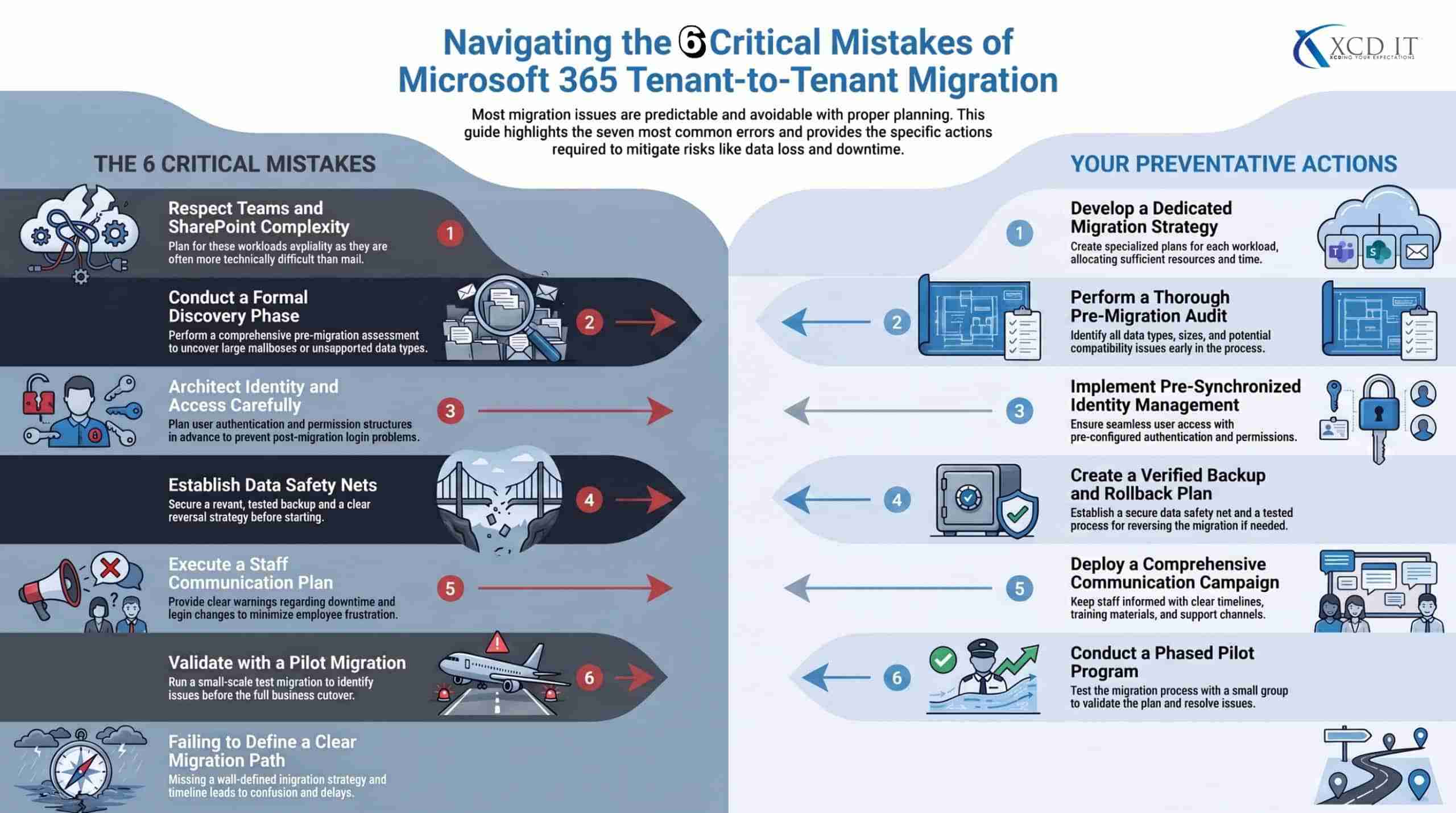
Underestimating Teams and SharePoint complexity
Many businesses assume mail migration is the hard part and treat Teams and SharePoint as an afterthought.
In practice, Teams chat history, channel structures, and the SharePoint sites that sit behind Teams are usually the most technically difficult part of the entire project. Plan for this workload specifically rather than assuming it will simply come along for the ride.
No proper pre-migration assessment
Skipping a genuine discovery phase, and instead just pointing a migration tool at the source tenant, tends to surface unpleasant surprises mid-project, such as unexpectedly large mailboxes, unsupported data types, or third party app integrations nobody accounted for.
No rollback plan
A migration should always include a plan for what happens if something goes seriously wrong mid-project. Businesses that skip this step sometimes find themselves with no clear way to reverse a problematic change once users have already started working in the new tenant.
Migrating without a recent backup
Tenant-to-tenant migration and data backup are related but different things, and a migration is not a substitute for having a proper backup of your data beforehand. If something goes wrong during the move, a recent, tested backup is what actually protects the business, not the migration tool itself.
Poor communication with staff
A migration that catches staff off guard, with no warning about downtime, login changes, or what might look different afterward, generates a wave of support tickets and frustration that a simple communication plan would have avoided.
Underestimating identity and access complexity
Decisions about how users authenticate in the new tenant, and how existing permissions and group memberships get recreated, are easy to underestimate and hard to fix quickly if they are done incorrectly. This is consistently one of the most common sources of post-migration problems.
Cutting over without adequate testing
Skipping a pilot migration with a small test group, and going straight to a full cutover, means the first real test of the process happens with the entire business watching, which is the worst possible time to discover a problem.
Microsoft 365 Tenant Migration for Mergers, Acquisitions, and Rebrands
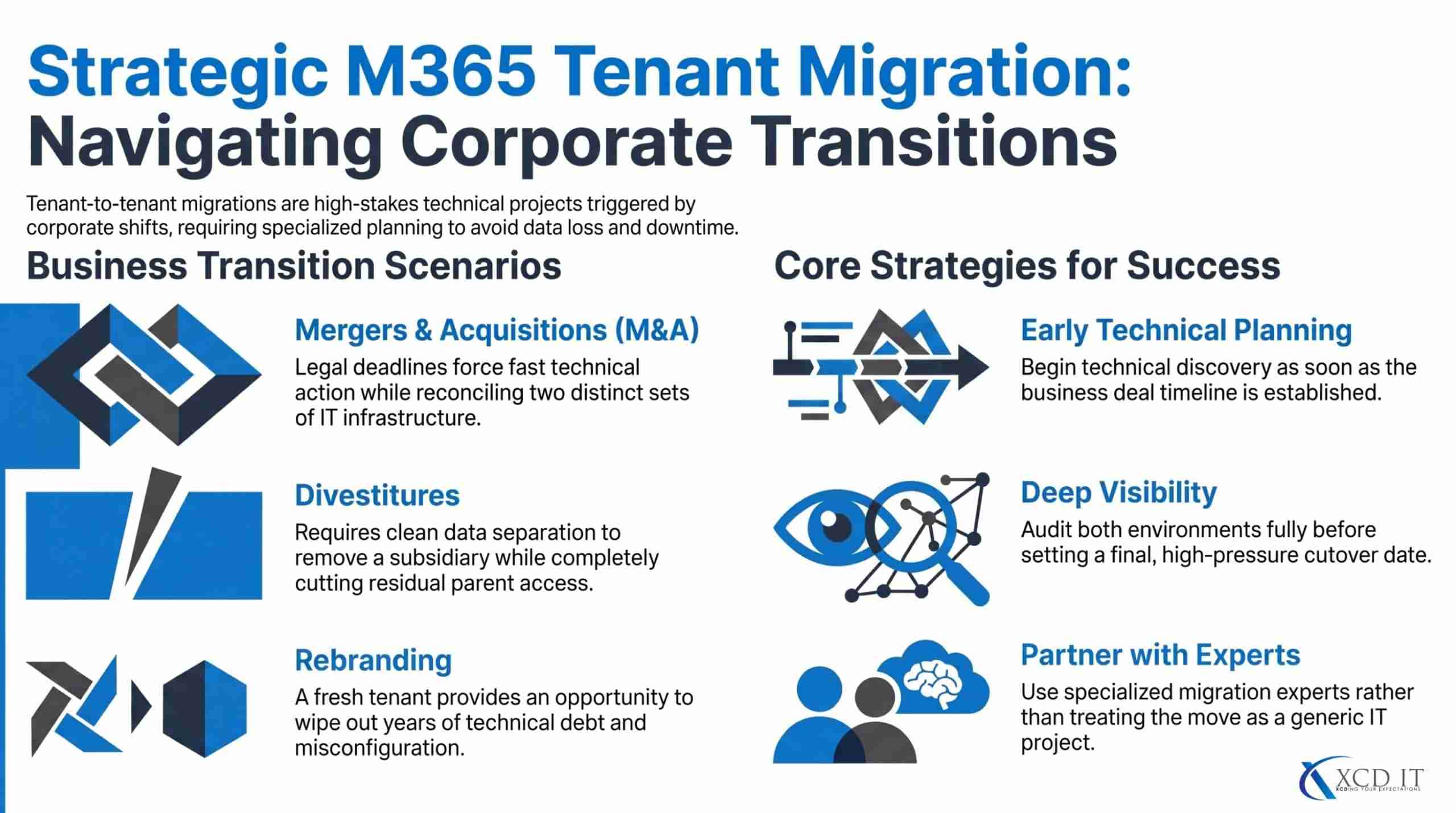
Mergers and acquisitions are the single most common reason businesses go through a tenant-to-tenant migration, and they come with a specific set of pressures that a routine internal migration does not.
Timelines in an M&A context are often driven by the deal itself rather than by what would be ideal from a purely technical standpoint. Legal, financial, and operational integration deadlines frequently force a faster technical timeline than an IT team would choose on its own, which increases the importance of proper planning rather than reducing it.
There are also usually two full sets of existing infrastructure, licensing, security policies, and IT support arrangements that need to be reconciled, not just merged. Two businesses coming together rarely have identical Microsoft 365 configurations, security postures, or even the same licensing tiers, and decisions need to be made about which standards the combined organisation will adopt going forward.
Divestitures carry a related but distinct challenge, since instead of combining two environments, a portion of one needs to be cleanly separated out into its own tenant, without leaving access to data or systems that should no longer be shared once the separation is complete.
Rebrands are less common as a standalone trigger, but they do sometimes coincide with a decision to move to a fresh tenant. This is particularly likely when a new domain name is involved, or when a business wants to leave behind years of accumulated technical debt in an older, poorly governed environment.
In all of these scenarios, the practical advice is the same. Start technical planning as early as possible relative to the broader business timeline, get proper visibility into both environments before committing to a cutover date, and work with a provider who has handled this specific kind of migration before rather than treating it as a generic IT project.
What Happens to Your Emails, Teams, and SharePoint Files During a Tenant Migration?
This is one of the most common practical concerns businesses have going into a migration, and the honest answer is that most things move successfully, but a few specific things reliably do not, or need manual attention afterward.
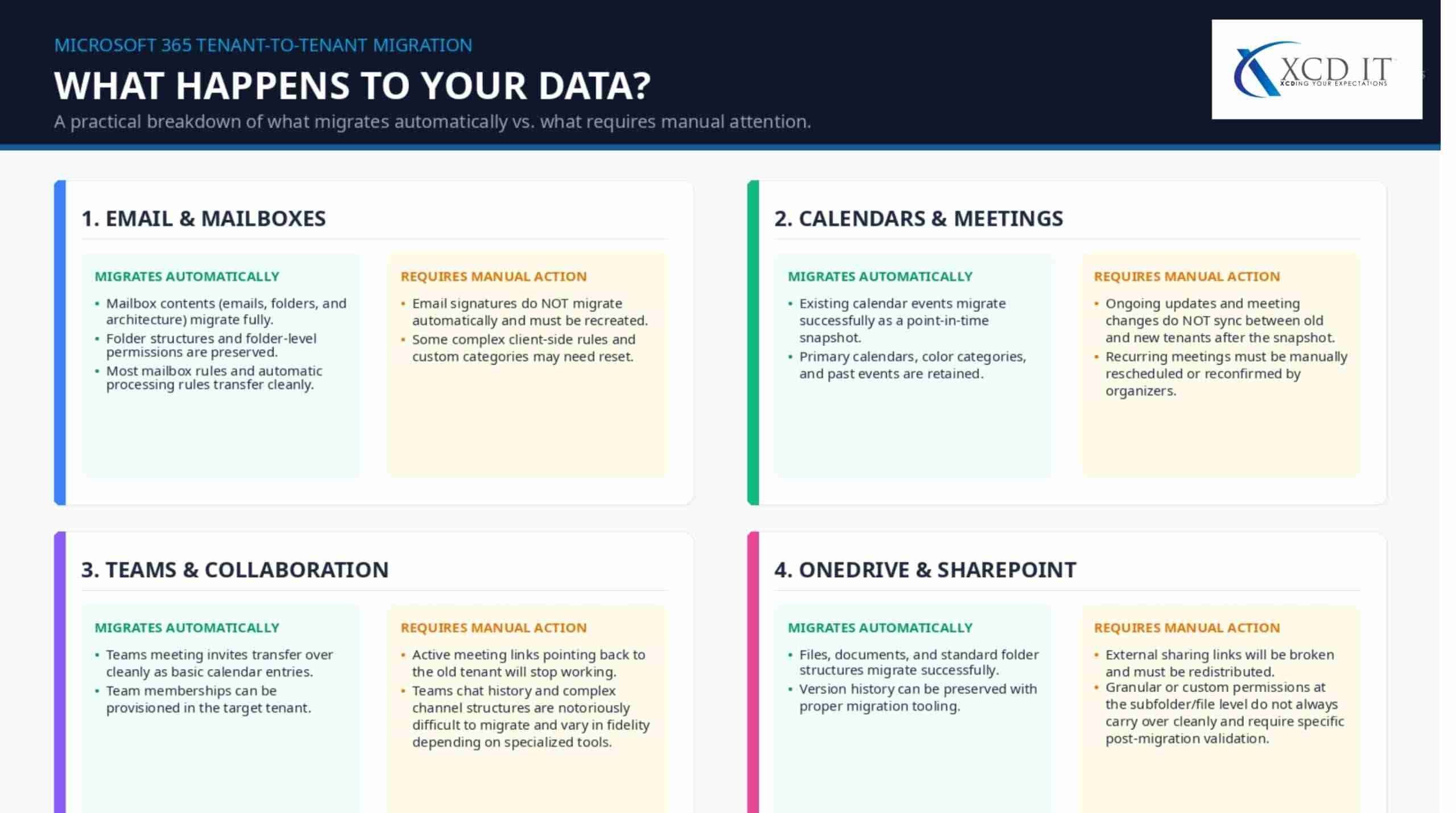
Mailboxes, folder structures, and most mail rules typically migrate successfully with modern migration tools. Email signatures generally do not migrate automatically and usually need to be recreated manually in the new tenant.
Calendars
Existing calendar events typically migrate as a point-in-time snapshot at the time of migration. Ongoing calendar updates are not synchronised between the old and new tenant after that point, which means any recurring meetings organised before the migration often need to be manually rescheduled or reconfirmed once everyone is in the new environment.
Teams
Teams meeting invites are usually migrated as calendar entries, but the actual meeting links pointing back to the original tenant typically cannot be automatically regenerated for the new tenant.
This means recurring Teams meetings scheduled before the migration commonly need to be recreated by the meeting organiser afterward. Teams chat history and channel structures are technically the most difficult workload to migrate cleanly, and fidelity here varies significantly depending on which tools and approach are used.
OneDrive and SharePoint
Files themselves generally migrate successfully, but permissions and sharing links are a common area for problems. Links that were shared externally, or permissions set at a granular folder or file level, do not always carry over cleanly and are worth specifically testing and validating as part of the migration, rather than assumed to have worked correctly.
The practical takeaway
None of this means a migration cannot be done well, it means a good migration plan explicitly accounts for these known gaps rather than assuming everything will simply transfer perfectly. A provider who can tell you upfront exactly what will and will not migrate automatically, rather than promising a completely seamless transition, is generally more trustworthy than one who does not mention these limitations at all.
How XCD IT Approaches Tenant-to-Tenant Migration
XCD IT provides tenant-to-tenant migration as part of its broader managed IT and Microsoft 365 services for SMBs (5 to 150 staff) across Brisbane, Gold Coast, and Sunshine Coast, rather than treating it as a one-off, disconnected project handled by an outside specialist with no ongoing relationship to the business.
That means migration planning is done with full visibility into a business’s existing Microsoft 365 licensing, security posture, and IT strategy, and the same team responsible for the migration itself remains responsible for supporting the business afterward, rather than handing off to a different provider once the project wraps.
For a business going through a merger, acquisition, divestiture, or simply consolidating multiple tenants after growth, that continuity matters. The team that planned the migration and understands exactly what was moved, what needed manual attention afterward, and how the new environment is configured, is also the team available to support staff in the weeks and months that follow.

Need Reliable IT Without the Surprise Costs?
With XCD IT, you get fully managed IT support for around $100–$250/month per user, with no hidden costs or unexpected bills.
Call 07 3085 7447
For urgent IT issues or immediate assistance
Our support team is ready to help.
Frequently Asked Questions

- 8+ Best Cybersecurity Companies in Brisbane (2026 Guide for SMBs) - November 7, 2026
- 20 Best Managed IT Service Companies in Brisbane (2026 Guide for SMBs) - November 7, 2026
- Co-Managed IT: How It Works With Your In-House IT Team - November 4, 2026


