
Is Microsoft Teams Premium worth adding to your Brisbane business’s Microsoft 365 subscription, or does standard Teams already do everything you need?
If you have seen Microsoft Teams Premium appear in your Microsoft admin centre or on a licensing page, you are not alone in wondering what it actually is. Teams Premium is an add-on licence that builds on top of standard Teams with AI-powered meeting tools, advanced security controls, and professional webinar capabilities. Whether it is worth the cost depends almost entirely on how your team uses meetings.
For some Brisbane businesses, Teams Premium delivers a meaningful, measurable return. For others, standard Teams handles everything they need and the add-on cost is not justified. This guide covers every feature in plain language, who genuinely benefits, and how to make the decision with confidence.
Key Takeaways Microsoft Teams Premium
- Microsoft Teams Premium is an add-on licence that builds on standard Teams. It does not replace your existing Microsoft 365 subscription.
- The headline feature is AI-powered meeting recap, which automatically generates summaries, action items, and chapter markers after recorded meetings.
- Other key additions include advanced webinar tools, live translation across 40 or more languages, enhanced meeting security controls, and custom branding.
- Teams Premium is not the same as Microsoft 365 Copilot. It provides AI features within Teams meetings only, not across Word, Excel, Outlook, or PowerPoint.
- Microsoft’s 2026 licensing updates moved some features that previously required Teams Premium into standard plans, making a licensing review worthwhile for existing Premium subscribers.
- You only need to licence users who require Premium features, not your entire organisation.
- XCD IT helps Brisbane SMBs assess whether Teams Premium is the right fit and configures it properly when it is.
What Is Microsoft Teams Premium?

Teams Premium is a [teams premium license] add-on layered on top of an existing Teams or Microsoft 365 licence, priced at $10 USD per user per month, approximately $15 to $16 AUD depending on the exchange rate and reseller, and typically [paid yearly]. It requires an existing Microsoft 365 subscription as a base, whether that is Business Basic, Business Standard, Business Premium, or Teams Essentials.
It is important to understand what Teams Premium is not before diving into what it includes. Teams Premium is not a replacement for your Microsoft 365 subscription. It does not give you access to Microsoft 365 Copilot across all applications.
It does not upgrade your storage, add new Microsoft 365 apps, or change your email or SharePoint configuration. It is specifically and exclusively a set of [additional features] for Teams meetings and events.
With that framing in place, here is what it actually adds. Businesses can start with a [free trial] or purchase the premium licence through their Microsoft reseller.
What Microsoft Teams Premium Adds: Every Feature Explained
AI-Powered Meeting Recap and Intelligence
This is the feature that drives the majority of Teams Premium decisions among Brisbane businesses, and it is the one most likely to deliver a tangible, measurable return on investment for meeting-heavy teams.
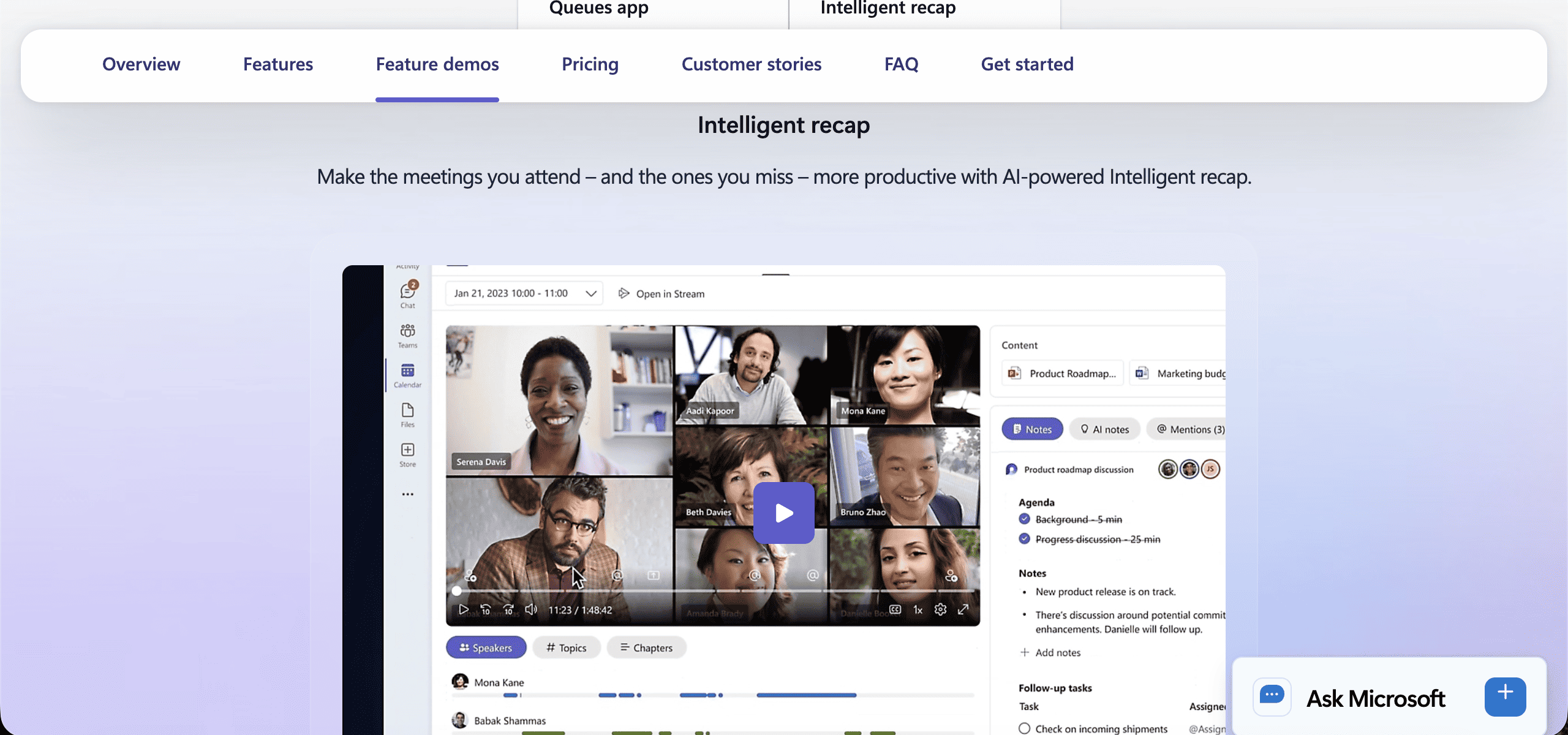
Standard Teams allows meetings to be recorded and automatically transcribed. The transcript is searchable after the meeting, which is useful, and recap helps people catch up on meetings they missed. But reviewing a raw transcript or rewatching a recording to find a specific decision or action item still takes significant time, particularly for meetings that run an hour or more.
Teams Premium changes this with AI-generated meeting intelligence. After a recorded and transcribed meeting, the AI automatically produces a concise executive summary of what was discussed, including key points, an intelligent recap with a structured list of action items with the names of the people responsible for each one attached, AI-generated chapters that divide the recording by topic, timeline markers that make navigation easier, and intelligent highlights for each participant that surface content specifically relevant to them, such as tasks assigned to them or topics they were mentioned in.
For Brisbane businesses where meetings are frequent and follow-up accountability is a recurring challenge, this is not a minor convenience feature.
The practical value comes from the reduction in time spent on post-meeting administration. Consider a professional services firm in Brisbane with 10 staff attending three or four meetings per week, where recap also supports notes and follow ups after meetings.
If AI recap saves each person 20 to 30 minutes of note-taking, summary writing, and action item distribution per week, that is 200 to 300 minutes of recovered productive time per week across the team. At even a modest staff cost, the return comfortably exceeds the licence cost, and the clear benefit is faster review and follow-up.
The important caveat: AI recap requires that the meeting is both recorded and transcribed. Recording and transcription need to be enabled as a meeting policy by your administrator. Meeting templates can also reduce time spent configuring specific meeting options for recurring meeting types.
If your Brisbane business upgrades to Teams Premium without configuring these settings, the AI features will not activate. The base license and premium license both need to be assigned correctly for these features to work properly. This is one of the most common configuration gaps XCD IT identifies when new clients come to us having already purchased Teams Premium.
Live Translation for Meetings

Standard Teams provides captions during meetings in a chosen language, but only if the speaker’s language is correctly detected. There is no translation between languages.
Teams Premium adds real-time spoken language translation across more than 40 languages. During a live meeting, you can hear audio in your preferred language while other participants speak in theirs. The add-on includes live translated captions, and captions and transcripts also help participants who prefer to read rather than listen, reflecting the translated content in real time rather than the original spoken language.
For Brisbane businesses with international clients, offshore development or operations teams, or staff from diverse language backgrounds, live translation removes a friction point that standard Teams cannot address. It is particularly relevant for Queensland businesses in sectors with significant international engagement including education, tourism, resources, construction, and import and export.
The quality of live translation in Teams has improved substantially through Microsoft’s AI investment in 2025 and 2026, making it a genuinely practical tool rather than a novelty feature. This can also enhance collaboration and productivity in multilingual meetings, and the add-on includes SMS integration.
Advanced Webinar Tools and Virtual Appointments

Standard Teams includes basic webinar support. You can host an event, manage attendee registration, and present to a large audience. The standard version covers basic webinar needs in MS Teams before businesses step up to Premium for more control. For simple internal training sessions or informal external briefings, this baseline capability is sufficient.
Teams Premium extends the webinar experience considerably for Brisbane businesses that run client-facing events as a regular part of their operations. It also makes hosting webinars more professional, with stronger control across registration, delivery, and follow-up.
The green room feature allows presenters and panellists to enter a private space before the event opens to attendees, where they can check audio and video, review their slides, and coordinate with co-presenters without attendees observing the preparation. This mirrors the experience of a professionally hosted event rather than a meeting that attendees join while the host is still setting up.
Attendee registration through Teams Premium supports custom confirmation and reminder emails that carry your branding rather than generic Microsoft templates. The registration experience itself can be customised to reflect your organisation’s visual identity. It is also especially useful for virtual appointments and other scheduled client sessions, with smoother reminder flows for appointments that can include sms notifications for attendees.
Q&A management in Teams Premium is structured rather than relying on the standard meeting chat. Questions are submitted through a dedicated Q&A panel, can be moderated before being answered, and can be addressed in order of priority rather than chronological submission. Teams Premium also supports interactive features like polls during webinars.
Post-event attendee reporting provides data on who registered, who attended, how long each attendee stayed, and engagement metrics. Teams Premium supports up to 20,000 view-only webinar attendees. For Brisbane businesses that run webinars as part of their sales or client engagement process, this data helps measure event effectiveness, support post-event follow ups, and identify engaged prospects.
For organisations running external training programmes, client briefings, product demonstrations, industry events, or town halls through Teams, the gap between standard Teams webinars and Teams Premium webinars is the difference between an internal video call and a professional hosted event, with clear benefits for service-based businesses presenting a more professional experience and improving customer experiences.
Enhanced Meeting Security
Standard Teams provides solid baseline security: encryption in transit and at rest, lobby controls, attendee permission management, and the ability to restrict who can present or share content. For most internal meetings, this is more than adequate.
Teams Premium adds advanced tools and stronger meeting-level security controls for situations where the content is sensitive or confidential.
End-to-end encryption, which in standard Teams is available only on one-to-one calls, is extended to group meetings in Teams Premium. With end-to-end encryption enabled, meeting content is encrypted such that only the meeting participants can access it. Not even Microsoft can access the content of an end-to-end encrypted meeting. Encrypted meetings support up to 200 participants.
Meeting watermarking displays each attendee’s email address as a visible overlay on video feeds and shared content throughout the meeting. The practical purpose is deterrence: anyone attempting to capture meeting content through screenshots or screen recording will have their email address visible in the captured material, making unauthorised distribution traceable. For example, in a board meeting discussing confidential information or other sensitive information, this helps discourage leaks if someone tries to capture the screen.
Sensitivity labels allow your IT administrator to define meeting security policies that apply based on the classification of the meeting. A meeting labelled as Confidential might automatically control who can record and access content, restrict transcript access to named participants only, and prevent attendees from forwarding the meeting invitation. These policies apply automatically when the label is selected, removing the need for the meeting organiser to manually configure security settings for every sensitive meeting. To use these capabilities, the right underlying and add-on licenses must also be in place.
These features are most relevant for Brisbane businesses in regulated industries including legal, financial services, healthcare, and professional services where meeting content has compliance, legal, or confidentiality implications and enhanced security is essential.
Custom Meeting Branding
Teams Premium allows organisations to apply their own visual identity to meeting experiences. This includes the pre-join screen that attendees see before entering a meeting, the meeting lobby, and the broader meeting environment including background options, helping organisations create a more tailored meeting environment through branded assets. It also supports meeting templates for standardising branded meeting setups.
Custom mode scenes can also reinforce brand identity in external meetings.
For internal-only meetings, custom branding is a lower priority. For client-facing Brisbane businesses where external parties regularly join Teams meetings, it removes the generic Microsoft aesthetic and replaces it with a branded experience consistent with your other client touchpoints.
The practical impact is similar to the difference between sending a client a plain email and sending them a properly formatted communication on letterhead. The content may be identical, but the branded experience signals professionalism and attention to detail.
Advanced Meeting Analytics
Standard Teams provides administrators with basic usage analytics at an organisational level: how many meetings were held, participant counts, and broad usage trends.
Teams Premium adds per-meeting engagement analytics that are considerably more granular. You can see individual-level attendance data, engagement scores based on active participation during the meeting, and data on which sections of a recorded meeting were replayed or skipped by viewers after the fact.
For Brisbane businesses running regular training sessions, client briefings, compliance updates, or all-staff presentations, this data helps evaluate whether content is landing effectively and where participants are disengaging. It turns meeting recordings from passive archives into sources of actionable feedback on communication effectiveness.
What Microsoft Teams Premium Does Not Include
Given that Teams Premium is sometimes confused with other Microsoft AI products, it is worth being explicit about what it does not provide.
Teams Premium does not include Microsoft 365 Copilot. Copilot is a separate, significantly more expensive add-on licence that provides AI assistance across the full Microsoft 365 suite including Word, Excel, Outlook, PowerPoint, and Teams. Teams Premium’s AI features are specifically limited to the meeting experience within Teams.
If your Brisbane business wants AI assistance drafting emails in Outlook, summarising documents in Word, or generating formulas in Excel, Teams Premium will not deliver that. If you specifically want AI meeting summaries and the other meeting-focused features described above, Teams Premium is the right and considerably more affordable option.
Some Brisbane businesses have both Teams Premium and Microsoft 365 Copilot. The two products serve different purposes and are not redundant with each other.
The 2026 Licensing Update of Microsoft Teams Premium: What Changed
Microsoft’s 2026 licensing updates moved some features that previously required Teams Premium into standard Teams plans. Specifically, certain room booking, event hosting, and workspace features, including Microsoft Places, are now part of licensing discussions, though Teams Premium still requires an underlying Teams license.
If your Brisbane business has been paying for Teams Premium primarily for features that have now moved to standard Teams, a licensing review is worthwhile. You may be able to reduce the number of Premium licences, or eliminate them entirely, without losing the functionality your team actually uses. That review should also confirm whether teams premium features still justify each Teams Premium license after the update.
XCD IT conducts Teams licensing reviews for Brisbane clients as part of our managed IT service, identifying where spend is generating value and where it is not.
The core Teams Premium differentiators, including AI meeting recap, advanced webinar tools, meeting security controls including watermarking and sensitivity labels, live translation, and custom branding, remain Premium-only features and have not moved to standard plans.
Who Needs Microsoft Teams Premium and Who Does Not
Based on what the features actually deliver, Teams Premium makes practical sense for Brisbane businesses in the following situations.

Meeting-heavy teams where follow-up accountability is a challenge. If your Brisbane business runs frequent meetings and action items regularly fall through the cracks, AI-generated recaps with assigned tasks and chapter markers address a real operational problem. The question is whether the time saved per person per week justifies the licence cost per person per month.
Client-facing businesses running external webinars or events through Teams. The gap between standard Teams webinars and Premium webinar tools is the gap between an internal meeting experience and a professional hosted event. For Brisbane businesses where webinars are part of the sales, training, or client engagement process, the professional presentation matters.
Regulated industries with meeting-level confidentiality requirements. End-to-end encryption, watermarking, and sensitivity labels are relevant for Brisbane businesses in legal, financial services, and healthcare where meeting content has compliance or legal implications.
Businesses with international teams or clients. Live translation makes Teams meetings accessible across language barriers in a way that standard Teams cannot replicate.
Teams Premium is likely not justified for Brisbane businesses where Teams is used primarily for internal chat and informal video calls, with no significant compliance requirements, no external-facing events, and no particular need for AI meeting intelligence. Standard Teams handles those use cases well and the add-on cost does not deliver proportionate value.
How XCD IT Helps Brisbane SMBs Decide
If you are uncertain whether Teams Premium makes sense for your Brisbane business, XCD IT can review how your organisation actually uses Teams and give you a clear recommendation based on your specific meeting patterns, compliance requirements, and whether you run external events.
When Teams Premium is the right choice, we configure it correctly from the start: enabling recording and transcription policies so AI recap works as intended and the features are configured to work properly for the right users, setting up webinar branding and registration workflows, configuring meeting sensitivity labels, and making sure every feature you are paying for is actually active and accessible to the right users.
As a Microsoft Partner supporting over 100 SMBs across Brisbane, the Gold Coast, and the Sunshine Coast, we also manage Microsoft 365 licensing as part of our ongoing managed service, keeping your licensing aligned with how your business actually works rather than how it worked when you first set up Microsoft 365, and helping you purchase the right number of licences if you decide to proceed.

Need Reliable IT Without the Surprise Costs?
With XCD IT, you get fully managed IT support for around $100–$250/month per user, with no hidden costs or unexpected bills.
Call 07 3085 7447
For urgent IT issues or immediate assistance
Our support team is ready to help.
Frequently Asked Questions Microsoft Teams Premium

- Co-Managed IT: How It Works With Your In-House IT Team - November 4, 2026
- IT Maintenance Checklist for Small Businesses (Weekly, Monthly, Yearly) - November 1, 2026
- Best Business VPNs for Brisbane SMBs: Complete Guide for 2026 - October 21, 2026


