
What is virtual infrastructure, and why are so many Queensland businesses replacing their physical servers with it?
If someone told you that your entire server room, including the hardware, the storage, and the networking, could be replaced by software running somewhere else, you might be sceptical. But that is essentially what virtual infrastructure does, and for thousands of Australian small and medium businesses, virtual infrastructure is already the norm rather than the exception.
Whether you are outgrowing ageing physical servers, tired of emergency hardware failures at the worst possible time, or simply want more flexibility in how your IT is managed, virtual infrastructure is worth understanding properly before your next hardware decision. This guide walks through what virtual infrastructure is, how it actually works under the hood, what it costs, and whether it makes sense for your business right now.
Key Takeaways: Virtual Infrastructure
- Virtual infrastructure uses a hypervisor to run multiple virtual machines on shared physical hardware, replacing the old one server, one job model.
- Physical servers typically use only 10 to 20 percent of their real capacity. Virtual infrastructure fixes that problem.
- Virtual machines can be moved, backed up, and restored independently of any single piece of hardware.
- Virtual infrastructure can run on premises, in a private cloud, in a public cloud, or as a hybrid mix of all three.
- Moving to virtual infrastructure means lower hardware costs, faster provisioning, simpler backups, and far less downtime.
- You usually do not need to replace all your hardware. Existing servers can often be repurposed as virtual infrastructure hosts.
What Is Virtual Infrastructure
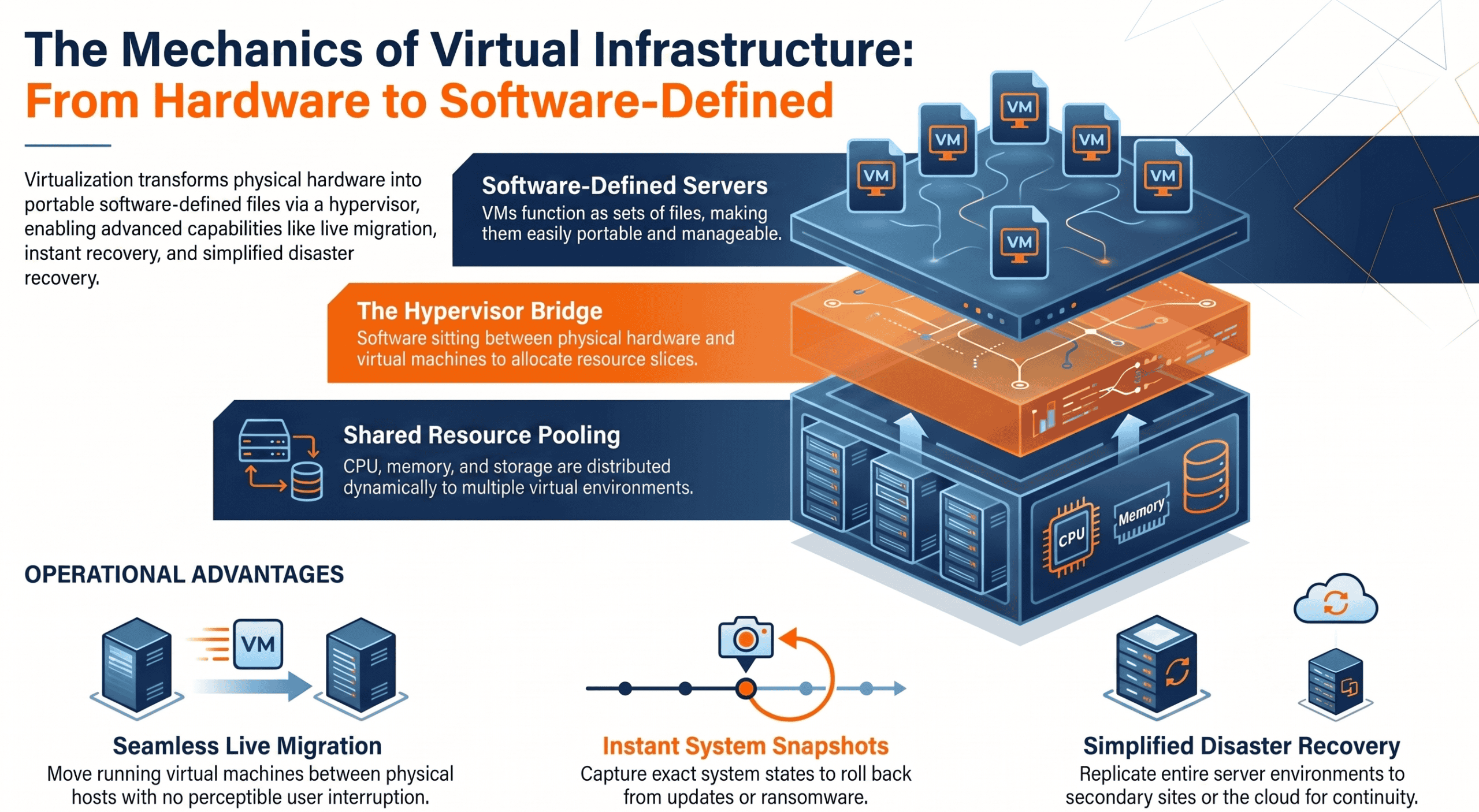
Virtual infrastructure is the use of software to create and manage IT resources, including servers, storage, and networking, that are not tied to any single piece of physical hardware.
At the centre of virtual infrastructure is a technology called virtualisation. A piece of software called a hypervisor runs on a physical server and forms the virtualization layer. It lets multiple operating systems run on a single physical machine by creating each virtual machine (VM) as a software-based computer. Each VM behaves like a physical computer, complete with its own operating system, applications, and data.
One physical host running virtual infrastructure might support five, ten, or twenty virtual machines simultaneously as separate virtual instances, with the physical server acting as the host computer for multiple systems while each remains completely isolated from the others.
Those virtual machines are not anchored to any particular piece of hardware. They can be moved between physical hosts, copied, backed up, and restored using nothing more than software commands.
If the physical server hosting a virtual machine develops a fault, virtual infrastructure can often migrate that virtual machine to a healthy host automatically, with little to no disruption for the people using it.
The same underlying principle extends beyond servers into storage and networking. Virtual infrastructure abstracts capacity from physical storage and each physical device into pooled virtual storage rather than tying it to one device, so capacity can be added or reallocated without physically swapping hardware.
Virtual networking, including switches, firewalls, and routers configured in software rather than wired into dedicated boxes, supports creating virtual networks and allocating network resources with the same capabilities as the network layer of your IT environment.
The combined result of virtual infrastructure is an IT environment that is faster to provision and easier to manage centrally with simplified server management. It is also more resilient to hardware failure. Additionally, it is significantly more cost efficient than its physical equivalent.
The Problem With Traditional Physical Infrastructure
For most of the history of business computing, IT infrastructure meant traditional infrastructure built from physical components such as servers, storage systems, and networking equipment.
A server in a cupboard or a dedicated server room, where in a traditional environment resources were tied to dedicated gear. Maybe a network attached storage device. A rack of switches and cables that someone, either your internal IT team or a contractor, had to manage, patch, cool, and eventually replace.
This model worked for decades, but it came with a set of well known frustrations most business owners have experienced firsthand, and they are exactly what virtual infrastructure was designed to solve.
Hardware fails, often without warning
When a physical server goes down, it takes everything running on it down with it. Depending on your backup setup, that might mean a few hours of disruption or several days of lost productivity while a replacement is sourced, configured, and restored.
Hardware ages on a predictable but inconvenient schedule
A server purchased five years ago is approaching, or has already passed, the point where the manufacturer stops supporting it. That creates a forced decision. Spend significant capital on a refresh, often all at once, or keep running unsupported hardware and hope nothing goes wrong.
Hardware sits underutilised for the vast majority of its life
Independent studies into data centre efficiency have repeatedly found that the average physical server operates at somewhere between 10 and 20 percent of its real capacity. Despite a decade of efficiency initiatives across the industry, that number has barely moved.
In practical terms, a business buying a physical server to handle its peak workload is paying for capacity it uses only a small fraction of the time. This is one of the clearest financial arguments for virtual infrastructure. Consolidating workloads onto fewer machines creates direct cost savings by reducing hardware, power, and maintenance overhead.
Hardware takes physical space, power, and ongoing attention
Running a server room, even a modest one or small data center, means ongoing space, power, and support overhead, along with electricity costs, cooling requirements, physical security considerations, and a person, internal or outsourced, responsible for keeping it all running.
Virtual infrastructure was built specifically to solve these problems at the same time, rather than trading one frustration for another.
How Virtualisation and Virtual Machines Actually Work
It helps to understand the mechanics of virtual infrastructure a little further, because this is where most of the practical benefits actually come from.
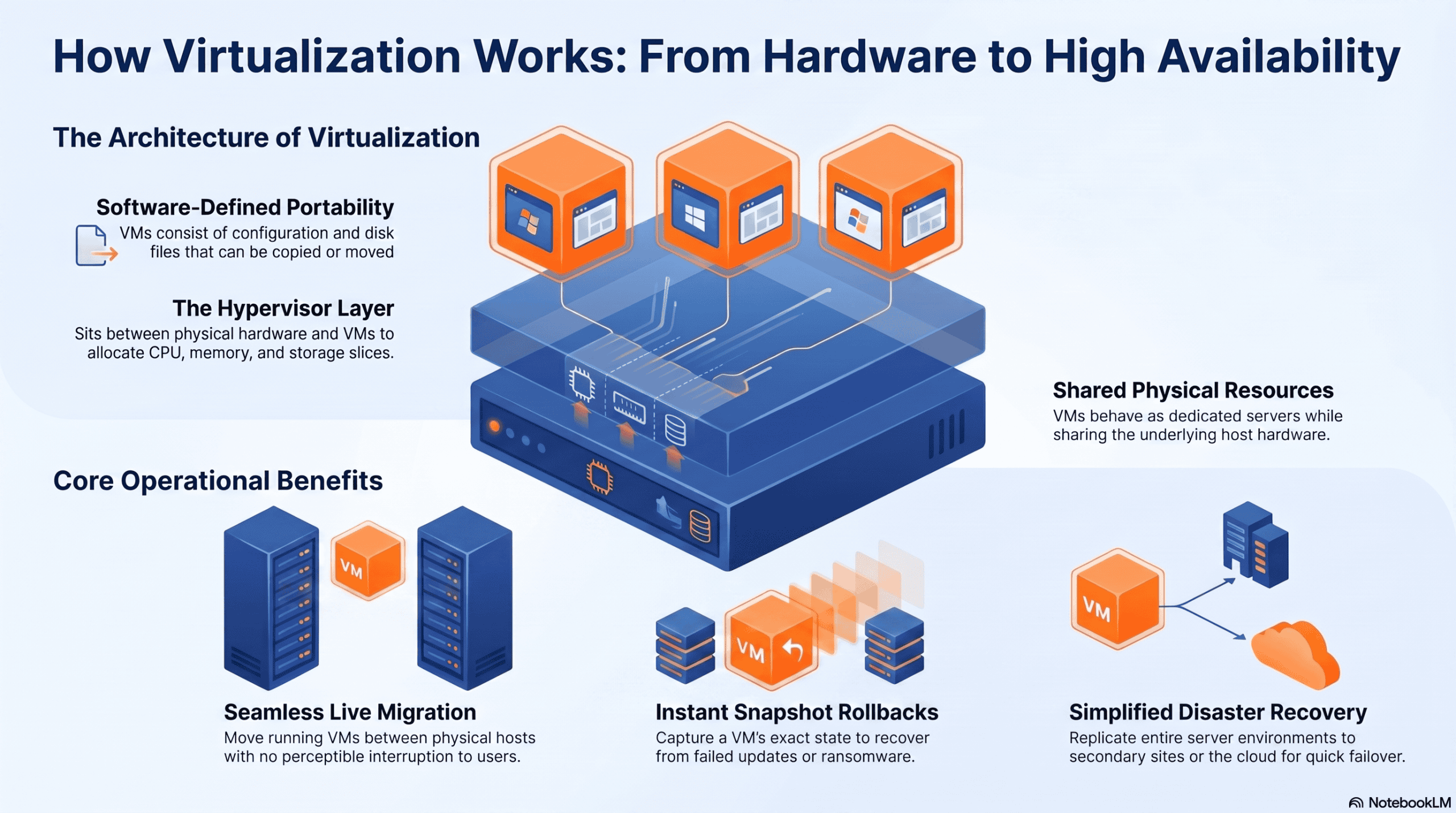
A physical server running a hypervisor essentially becomes a host for virtual infrastructure. The hypervisor sits between the physical hardware, including CPU, memory, storage, and network interfaces, and the virtual machines running on top of it. It separates the physical hardware from the workloads using it. As the software layer, it manages virtual machines and allocates host resources as needed.
Each virtual machine behaves as though it is running on its own dedicated server. It has its own virtual CPU, memory, and disk, with a guest operating system and software programs running independently above the underlying hardware. However, it actually shares the underlying physical resources with several other virtual machines on the same host.
Because each virtual machine within a virtual infrastructure environment is really just a set of files, a configuration file describing its virtual hardware, and one or more disk image files containing its operating system, applications, and data, those files can be copied, moved, or backed up like any other file.
The same abstraction can also span multiple physical servers. This flexibility enables efficient management and mobility of virtual machines across different hardware.
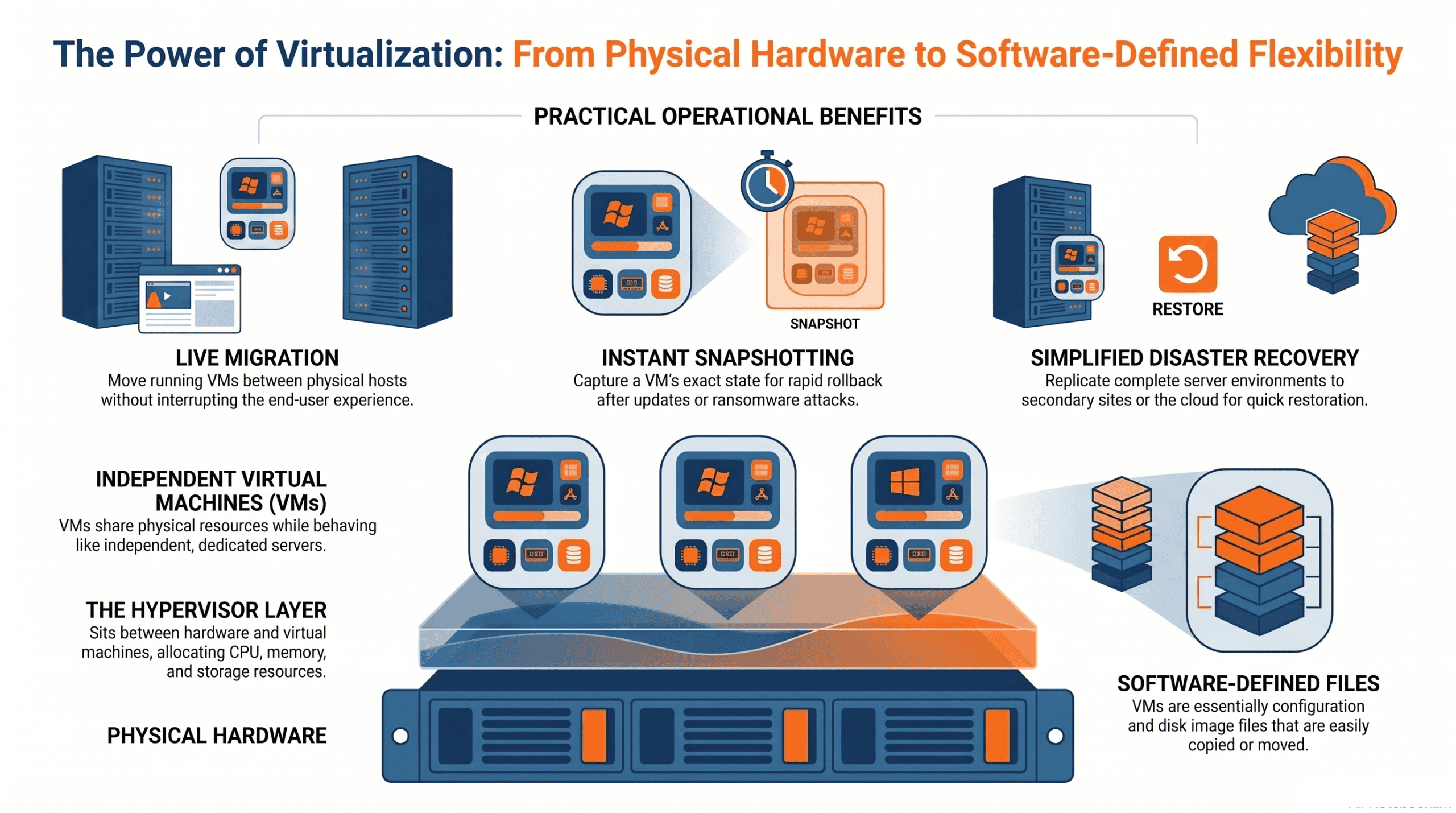
This is what makes live migration possible. A virtual machine can be moved from one physical host to another while it is still running, often with no perceptible interruption to users.
It is also what makes snapshotting possible. A snapshot captures the exact state of a virtual machine at a specific point in time, including every file, setting, and piece of data. It does this without needing to take the virtual machine offline.
This improves infrastructure management and supports virtual infrastructure management in virtualized environments.
Choosing the correct virtual machine sizing and lifecycle settings also helps avoid waste and keeps efficient systems running reliably. If something goes wrong afterwards, whether that is a failed software update, a ransomware incident, or simple human error, the virtual machine can be rolled back to that snapshot in minutes rather than rebuilt from scratch.
This is also why virtual infrastructure pairs so naturally with disaster recovery. Because virtual machines are software defined rather than hardware defined, a complete copy of a business’s server environment and business data can be replicated to a second site, such as another office, a data centre, or the cloud.
This copy can be brought online quickly if the primary site becomes unavailable. This capability enhances business continuity and disaster recovery.
Physical vs Virtual Infrastructure: A Quick Comparison
Traditional infrastructure depends on fixed hardware, while virtualized infrastructure is more flexible and efficient because workloads can move in software instead of staying tied to one machine.
| Factor | Traditional Physical Infrastructure | Virtual Infrastructure |
|---|---|---|
| Downtime risk | A hardware failure takes the whole server offline | Workloads can shift to another host automatically |
| New server setup | Days to weeks (ordering, delivery, installation) | Minutes, provisioned in software |
| Hardware utilisation | Typically 10 to 20 percent of real capacity | Multiple workloads share one host efficiently |
| Backup and recovery | Manual, hardware dependent backup processes | Point in time snapshots, easily stored offsite |
| Scaling up | Buy, ship, and install new physical servers | Add capacity to an existing shared resource pool |
| Typical cost profile | High upfront capital expenditure | Spread cost, better hardware to workload ratio |
Key Benefits of Virtual Infrastructure for Queensland SMBs
Resilience and uptime
When a physical server fails in a virtual infrastructure environment, the workloads it was running can be automatically shifted to other available hardware.
Many businesses running virtual infrastructure report near zero downtime from hardware failures that would have been all hands emergencies under a purely physical setup, while still getting many of the same capabilities as dedicated hardware with better flexibility.
Cost reduction
By consolidating multiple workloads onto shared physical hardware, virtual infrastructure dramatically reduces the amount of hardware a business needs to buy, power, cool, and maintain.
Running ten virtual servers across two physical hosts is considerably cheaper, in hardware, electricity, and ongoing maintenance, than running ten separate physical servers, and reducing the number of physical machines also lowers operating costs.
Speed and flexibility
In a purely physical environment, provisioning a new server can mean ordering hardware, waiting for delivery, and spending time on installation.
With virtual infrastructure, a new virtual machine can be provisioned in minutes, which matters most when a business needs to stand up a new application quickly or respond to rising consumer demand.
Simplified backup and recovery
Because virtual infrastructure allows virtual machines to be snapshotted and those snapshots stored offsite, recovering from a problem becomes a matter of restoring from a known good snapshot rather than rebuilding a server from the ground up.
Scalability that matches business growth
As a business grows, virtual infrastructure scales by adding capacity to the shared resource pool rather than ordering and installing new physical servers one at a time, making IT investment far more predictable.
Where Can Virtual Infrastructure Live
Virtual infrastructure is not limited to one location. It can run on premises, in a cloud environment, or across integrated cloud services, with cloud technology enabling shared resources and flexible delivery models, and many businesses ultimately use a hybrid combination of all three.
| Model | What It Means | Best For |
|---|---|---|
| On premises virtual infrastructure | Physical servers in your office running virtualisation software such as VMware or Microsoft Hyper V. You control the hardware but gain all the benefits of virtual infrastructure on top. | Businesses with specific compliance, latency, or data residency needs |
| Private cloud | Virtual infrastructure hosted in a dedicated data centre, managed by you or a provider. You get the benefits without hardware on site. | Regulated industries (healthcare, finance, legal) needing dedicated resources |
| Public cloud | Virtual infrastructure hosted by providers like Microsoft Azure, AWS, or Google Cloud. Pay for what you use, no hardware to own. | SMBs wanting flexibility, low upfront cost, and easy scaling |
In practice, many Queensland SMBs end up running a hybrid virtual infrastructure model. Enabled by cloud computing, sensitive or latency critical workloads are kept on premises or in a private cloud, while everyday tools like email, file storage, file sharing, and Microsoft 365 run in the public cloud.
This hybrid approach lets a business get the security and control benefits of private infrastructure where it matters most, while still getting the cost and flexibility benefits of public cloud everywhere else.
Common Myths About Virtual Infrastructure
“Virtual infrastructure is only for large enterprises.” This was true years ago, when virtualisation software was expensive and complex to manage. It is no longer the case. Modern virtual infrastructure platforms, combined with managed service support, have made virtualisation genuinely accessible and cost effective for SMBs with as few as ten to twenty staff.
“Moving to virtual infrastructure means replacing all our hardware.” In many cases, existing servers can be repurposed as virtual infrastructure hosts, extending the useful life of hardware that might otherwise be due for replacement.
“Virtual infrastructure is less secure than physical servers.” Virtualisation itself does not weaken security, and in several respects strengthens it. Snapshots make it easier to contain and recover quickly from incidents such as ransomware, and isolating workloads into separate virtual machines limits how far a compromise can spread.
“Virtual infrastructure always means moving to the public cloud.” Virtualisation and cloud are related but different things. You can build virtual infrastructure entirely within your own building, with no public cloud involvement at all.
“If our internet goes down, everything stops.” This depends entirely on which virtual infrastructure model you choose. On premises virtualisation continues running regardless of internet connectivity. Public cloud infrastructure does depend on internet connectivity, which is why businesses relying heavily on cloud hosted systems are generally advised to invest in redundant internet connections.
Is Virtual Infrastructure Right for Your Business
For most Queensland SMBs with ten or more staff, some form of virtual infrastructure makes sense. The economics are compelling, the reliability is demonstrably better than physical only setups, and the flexibility to scale up or down is genuinely useful as the business changes.
A few signs that your business is likely ready to move to virtual infrastructure:
- You have experienced at least one unplanned outage caused by ageing or failing hardware within the last twelve months.
- Your physical servers are more than four to five years old and are approaching, or have already passed, the end of vendor support.
- You find yourself replacing hardware reactively, after something fails, rather than as part of a planned and budgeted refresh cycle.
- Your team has had to delay launching a new application or project because provisioning new physical hardware took too long.
- You are not fully confident that your current backup setup would let you recover quickly in the event of a major failure.
If two or more of these sound familiar, it is worth getting a proper assessment of your virtual infrastructure options before your next hardware decision, rather than defaulting to another like for like physical replacement.
Beyond these warning signs, the core questions to work through with whoever manages your IT, including internal or external IT teams, are how workloads should be planned day to day. It is also important to consider how critical uptime is for each of those workloads.
Additionally, you need to evaluate what data sovereignty and compliance requirements apply to your industry. Another key consideration is whether you need to plan for storage resources and network resources alongside those workloads. Finally, decide whether you want infrastructure that you manage directly yourself or virtual infrastructure that is managed on your behalf by a provider.
Some businesses also need to consider whether staff require virtual desktop infrastructure to access a consistent desktop environment remotely, and whether desktop virtualization suits broader remote access needs.
None of these questions are especially complex on their own, but the answers genuinely shape which combination of on premises, private cloud, and public cloud is the right fit.
What a Migration to Virtual Infrastructure Actually Looks Like
Understanding the practical migration process helps take some of the uncertainty out of the decision to move to virtual infrastructure.
It typically starts with an assessment of your current environment. What hardware you have, what it is running, how each workload is used, and what your compliance and data residency obligations look like, including servers, storage devices, storage subsystems, and other network resources.
This is also where existing hardware that can be repurposed as a virtual infrastructure host gets identified, rather than assuming everything needs replacing.
From there, a target virtual infrastructure environment is designed, specifying which model, or combination of models, suits your business. It also details what new or repurposed hardware is required, separating physical hardware from the workloads so software-defined resources can be allocated without tying systems to dedicated devices. Additionally, the migration will be sequenced to minimise disruption to your team, with software defined compute and software defined networking considered where relevant.
The design phase should also account for how the business will manage virtual infrastructure after cutover, including capacity planning, workload monitoring, and backup and disaster recovery procedures. Lower risk workloads are usually migrated first to validate the approach before more critical systems are moved.
The actual migration itself, for most SMB environments, is completed within a few weeks rather than months, with careful scheduling to avoid disrupting normal business hours wherever possible.
Once migrated, there is a period of monitoring and fine tuning, and teams often use monitoring tools during cutover and validation to confirm performance, backups, and failover behaviour are all working as expected before the virtual infrastructure project is considered complete.
Centralized management dashboards can also streamline ongoing maintenance and visibility after migration.
During validation, settings should also be reviewed carefully, because default configurations can create security vulnerabilities in VNPaaS and SSL/TLS misconfigurations can lead to security breaches.
Throughout this process, the goal of a well run migration is that, from your team’s perspective, very little actually changes day to day. In well planned moves between virtual environments, users may keep the same user interface and direct access to applications even after workloads move.
Applications open the same way, files are in the same place, and systems behave the same way they always did. What changes is what happens behind the scenes when something goes wrong, or when the business needs to scale.
How XCD IT Helps
XCD IT designs and manages virtual infrastructure for SMBs across South East Queensland. As a Brisbane based Microsoft Partner and Gold SMB1001 Certified provider with over twenty years of managed service experience, we have helped businesses move from ageing physical servers to modern virtual infrastructure, whether that is on premises, in the cloud, or a hybrid of both.
We handle the assessment, design, migration, and ongoing virtual infrastructure management of your environment, helping you run virtual machines without your team having to think about the underlying technology at all, with broader infrastructure management across cloud services where needed.
If your business is running on old hardware, experiencing reliability issues, or simply wondering whether there is a better way to manage your IT, we would welcome a conversation.

Need Reliable IT Without the Surprise Costs?
With XCD IT, you get fully managed IT support for around $100–$250/month per user, with no hidden costs or unexpected bills.
Call 07 3085 7447
For urgent IT issues or immediate assistance
Our support team is ready to help.
Frequently Asked Questions

- 8+ Best Cybersecurity Companies in Brisbane (2026 Guide for SMBs) - November 7, 2026
- 20 Best Managed IT Service Companies in Brisbane (2026 Guide for SMBs) - November 7, 2026
- Co-Managed IT: How It Works With Your In-House IT Team - November 4, 2026


