
How do you create an IT roadmap that actually gets used, instead of one that gets written once and forgotten in a shared drive? For most small and mid-sized businesses, the answer is a document that ties technology decisions directly to business goals, budget cycles, and security requirements — reviewed on a set schedule rather than treated as a one-off report.
This guide walks through what an IT roadmap actually is, the step-by-step process for building one, a simple template you can adapt, and the mistakes that turn a roadmap into shelfware.
Key Takeaways of How to Create an IT Roadmap
- An IT roadmap is a living plan, not a static document. It maps technology initiatives — upgrades, security improvements, new tools — against timelines, budget, and business priorities, and it should be revisited on a recurring schedule, not written once and filed away.
- The best roadmaps start with business goals, not technology. Working backwards from what the business needs to achieve (growth, compliance, cost control, security) produces a more useful roadmap than starting with a list of tools or upgrades.
- A roadmap without an owner and a review cadence rarely survives contact with reality. Quarterly reviews are common practice, since priorities, headcount, and threats change faster than an annual plan can account for.
- Security and licensing decisions belong in the same roadmap, not in separate documents from separate providers — a roadmap that only covers hardware refreshes while ignoring identity, backup, and compliance gaps is an incomplete plan.
- A good roadmap is specific enough to act on. “Improve security” is not a roadmap item. “Enforce MFA across all Microsoft 365 accounts by Q2” is.
What Is an IT Roadmap?

An IT roadmap is a structured plan that lays out the technology initiatives a business intends to carry out over a defined period — usually 12 to 36 months — and connects each initiative to a business reason, a rough timeline, and a budget.
It typically covers things like hardware and software lifecycle planning, cybersecurity improvements, cloud migration or infrastructure changes, compliance requirements, and any major systems changes on the horizon.
The distinction worth understanding is that an IT roadmap is not the same as an IT strategy. A strategy sets the overall direction and priorities — for example, “reduce security risk” or “support growth to 50 staff without a proportional IT cost increase.”
The roadmap is the practical translation of that strategy into a sequenced list of projects with dates and owners attached. Businesses that only have a strategy document tend to know what they want but not when or how to get there; businesses that only have a project list without a strategy behind it tend to end up reacting to whatever broke most recently, rather than working toward anything.
Why Your Business Needs an IT Roadmap
Without a roadmap, IT spending tends to happen reactively — a server fails and gets replaced under pressure, a compliance requirement surfaces and gets patched together at the last minute, a new hire needs a laptop and whatever’s available gets ordered without much thought to standardisation.
None of this is necessarily wrong in isolation, but over a few years it produces a mismatched environment that’s harder to secure, harder to support, and more expensive to maintain than a deliberately planned one.
A roadmap also gives a business owner or leadership team a way to have the budget conversation in advance, rather than being surprised by IT costs as they arise. Knowing that a server refresh, a licensing renewal, and a security upgrade are all due in the same quarter is far more useful to plan around than discovering it after the invoices land.
How to Create an IT Roadmap: Step-by-Step
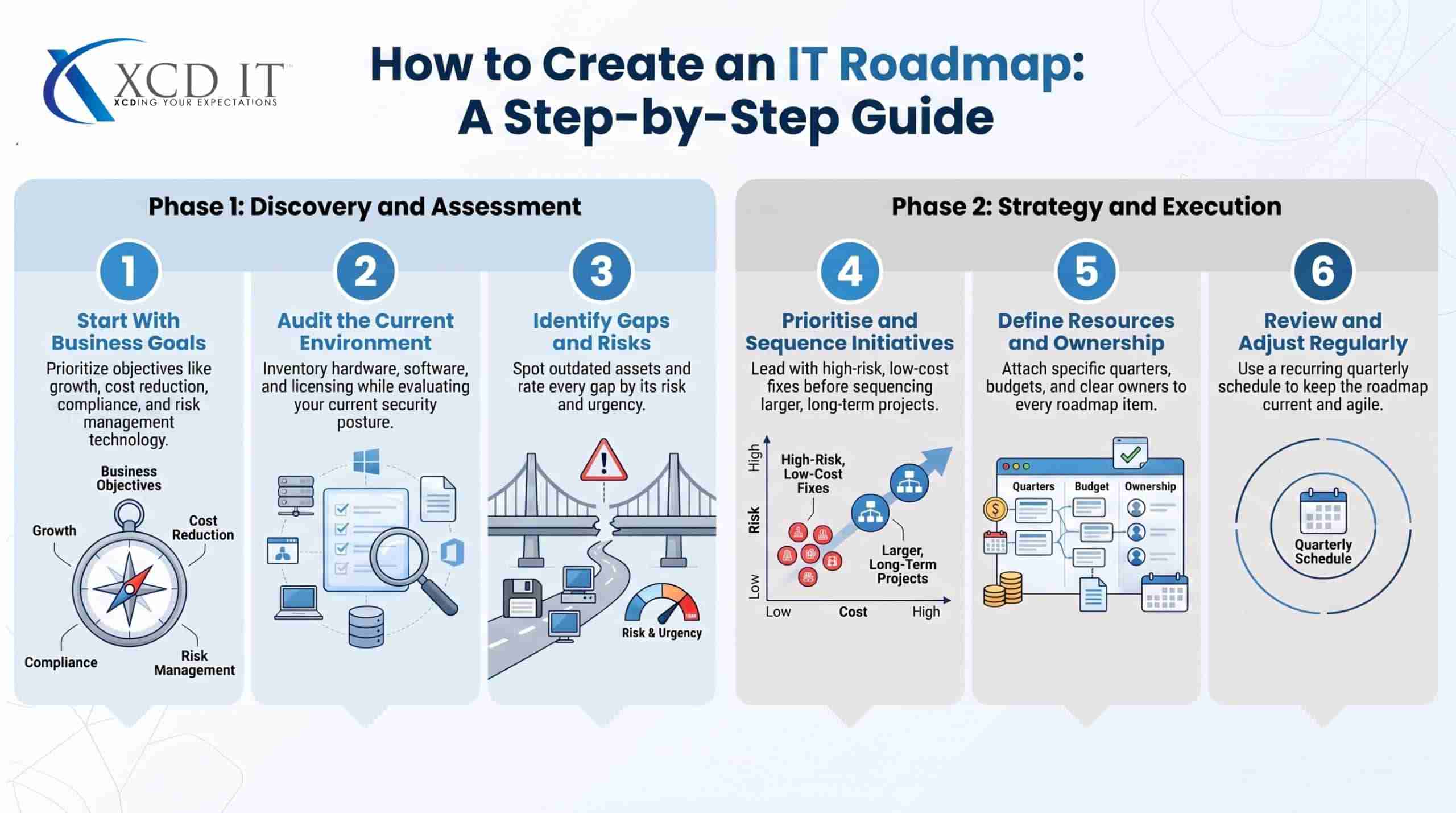
1. Start With Business Goals, Not Technology
Before listing any tools or upgrades, get clear on what the business is actually trying to achieve over the roadmap period.
Is the priority growth and headcount, cost reduction, compliance (such as meeting cyber insurance or Essential Eight requirements), or reducing risk after a past incident? Every technology decision that follows should trace back to one of these goals — if it doesn’t, it’s worth questioning whether it belongs on the roadmap at all.
2. Audit the Current Environment
A roadmap built without an honest picture of the current state is guesswork. This step typically covers:
- Hardware and software inventory — what’s in use, its age, and its remaining support lifespan.
- Licensing — which Microsoft 365 or other subscription tiers are in place, and whether they match what the business actually uses.
- Security posture — MFA enforcement, backup coverage, patching cadence, and any existing security score or vulnerability assessment.
- Pain points — where staff or systems are hitting friction right now, since these are often the clearest early signals of what needs to change.
3. Identify Gaps and Risks
With the current state and the business goals both on the table, the gaps become visible — outdated hardware nearing end-of-life, licensing that doesn’t support planned growth, security controls that don’t meet an insurer’s or regulator’s requirements, or manual processes that won’t scale past a certain headcount.
Each gap should be rated roughly by risk and urgency, since not everything can be tackled in the same quarter.
4. Prioritise and Sequence Initiatives
Turn the list of gaps into a sequenced plan. Security fixes with high risk and low cost (like enforcing MFA) typically come first.
Larger, more expensive projects (like a full infrastructure migration) get scheduled around budget cycles and business capacity to absorb change — most businesses can’t run three major IT projects in the same quarter without disrupting day-to-day operations.
5. Attach Timelines, Budget, and Ownership
Every item on the roadmap needs a rough timeframe (quarter or half-year is usually specific enough), an estimated cost, and a named owner — whether that’s an internal staff member or the managed IT provider responsible for delivery. A roadmap item with no owner tends to be the one that quietly slips every quarter.
6. Review and Adjust on a Recurring Schedule
A roadmap is a plan, not a prediction, and business conditions change faster than most annual reviews can keep up with. Quarterly business reviews are common practice — checking progress against the plan, adjusting for anything that’s changed (new headcount, a new compliance requirement, a shift in budget), and re-prioritising as needed.
A Simple IT Roadmap Template
A roadmap doesn’t need to be complicated to be useful. At minimum, each initiative should include:
IT Roadmap Template
A simple starting structure — adapt the number of rows to the size of your business.
| Initiative | Business Reason | Priority | Timeframe | Estimated Cost | Owner |
|---|---|---|---|---|---|
| Enforce MFA across Microsoft 365 | Reduce account compromise risk | High | Q1 | Low | IT provider |
| Server hardware refresh | Current servers out of warranty | Medium | Q2–Q3 | Medium–High | Internal + IT provider |
| Migrate file storage to SharePoint/OneDrive | Support remote/hybrid staff | Medium | Q2 | Low–Medium | IT provider |
| Cyber insurance readiness review | Meet insurer security requirements | High | Q1 | Low | IT provider |
| Microsoft 365 licensing review | Reduce unused license spend | Low | Q3 | None (cost saving) | Internal |
This structure scales up or down depending on the size of the business — a five-person office might need six rows, while a 100-person business might run a roadmap with 30 or more items grouped by category (security, infrastructure, applications, compliance).
Common Mistakes When Building an IT Roadmap

Treating It as a One-Time Document
A roadmap written once and never revisited drifts out of date within a couple of quarters. Priorities shift, headcount changes, new hires bring different tooling needs, and the threat landscape moves faster than an annual document can account for.
This mistake usually isn’t intentional — the roadmap gets built properly during onboarding or a planning session, then sits in a shared drive because no one owns the follow-up.
Six months later, half the “planned” initiatives have already happened informally and the other half are no longer relevant, but the document itself hasn’t moved. The fix isn’t a better document, it’s a standing calendar invite: a roadmap only stays useful if reviewing it is scheduled, not optional.
Starting With a Shopping List Instead of Business Goals
A roadmap built around “things we should probably upgrade” rather than “what the business needs to achieve” tends to produce a plan that’s technically busy but strategically thin.
This usually happens when the roadmap is built by IT in isolation, without input from leadership on where the business is actually headed.
The result is a list of sensible-sounding technical projects — a server refresh here, a software upgrade there — that don’t connect to anything the business is trying to do, which makes it hard to justify budget or sequence priorities when something has to give. A roadmap item should be able to answer “why does this matter to the business,” not just “why does this matter to IT.”
Leaving Security as an Afterthought
Security and compliance items are often the most time-sensitive entries on the roadmap, since they carry direct financial or regulatory risk if left unaddressed. In practice, security work is also the easiest to defer — it doesn’t have a visible failure point the way a dying server does, so it’s the first thing pushed to “next quarter” when budget tightens or a bigger project runs over.
That’s backwards: an unpatched vulnerability or missing MFA doesn’t wait for a convenient quarter, and the cost of a breach or a lapsed cyber insurance requirement almost always exceeds the cost of the fix. Security and compliance items should be flagged separately on the roadmap so they can’t quietly slide behind larger, more visible projects.
No Named Owner for Each Item

Initiatives without a clear owner are the ones most likely to be quietly dropped when priorities shift. “The IT team” or “the business” is not an owner — it’s a diffusion of responsibility that lets an item drift indefinitely because no single person is accountable for moving it forward.
A named owner, whether that’s an internal staff member or the managed IT provider, is what turns a roadmap line item into an actual task with a deadline. If an item can’t be assigned an owner, that’s often a sign it isn’t specific enough yet to be actioned.
Overloading a Single Quarter
Scheduling too many major projects into the same period increases the risk of disruption to day-to-day operations and makes it harder to deliver any of them well.
This tends to happen when a roadmap is built once a year in a burst of planning enthusiasm, front-loading urgent-sounding items without checking what the business — or the IT team — can realistically absorb alongside daily support work.
A migration, a hardware refresh, and a security overhaul running concurrently doesn’t just strain budget; it strains the staff and systems that have to keep functioning through all three changes at once.
Sequencing initiatives across the year, rather than clustering them, is usually what separates a roadmap that gets delivered from one that gets abandoned halfway through.
Writing It as a Wishlist Instead of a Budgeted Plan
A roadmap with initiatives but no attached cost estimates is closer to a brainstorm than a plan.
Without a rough budget figure next to each item, leadership can’t sequence initiatives against what’s actually affordable in a given quarter, and the roadmap becomes disconnected from the real conversation the business needs to have about spend.
Even a rough estimate — low, medium, or high, or a dollar range — is enough to make the roadmap usable for budget planning rather than just a list of good intentions.
A roadmap written once and never revisited drifts out of date within a couple of quarters. Priorities shift, headcount changes, and the threat landscape moves faster than an annual document can keep up with.
How Often Should an IT Roadmap Be Reviewed?
Most businesses benefit from a formal roadmap review at least quarterly, with a more thorough annual reset to re-align the roadmap against business strategy for the year ahead.
Faster-growing businesses, or those that have recently experienced a security incident or entered a new regulatory environment, generally benefit from more frequent check-ins. A roadmap that’s never revisited becomes just as outdated as any unreviewed IT system.
How XCD IT Approaches IT Roadmap Planning
XCD IT is a Brisbane-based managed IT provider built for SMBs (5–150 staff) across Brisbane, Gold Coast, and Sunshine Coast, and treats IT roadmap planning as an ongoing part of the managed relationship rather than a one-off report handed over and forgotten.
That means the same team responsible for reviewing your Microsoft 365 environment, security posture, and infrastructure is also the team building and revisiting the roadmap — so recommendations are grounded in your actual environment rather than a generic template, and progress against the plan gets checked at regular business reviews rather than left until something breaks.
For a Brisbane, Gold Coast, or Sunshine Coast SMB, the practical benefit is a roadmap that’s genuinely built around your business and reviewed often enough to stay useful — not a document produced once and left to go stale.

Need Reliable IT Without the Surprise Costs?
With XCD IT, you get fully managed IT support for around $100–$250/month per user, with no hidden costs or unexpected bills.
Call 07 3085 7447
For urgent IT issues or immediate assistance
Our support team is ready to help.
FAQs How to Create an IT Roadmap

- 8+ Best Cybersecurity Companies in Brisbane (2026 Guide for SMBs) - November 7, 2026
- 20 Best Managed IT Service Companies in Brisbane (2026 Guide for SMBs) - November 7, 2026
- Co-Managed IT: How It Works With Your In-House IT Team - November 4, 2026


