
What are the best business VPNs for Brisbane SMBs in 2026? NordLayer, Surfshark Business, and OpenVPN CloudConnexa lead the field, each serving different operational needs across small and medium businesses in South East Queensland.
The right VPN determines how securely your remote teams access company data, how reliably your cloud apps perform, and whether your business meets Australian compliance obligations.
This guide covers VPN selection, implementation, and ongoing management for small and medium businesses operating across Brisbane, Gold Coast, and Sunshine Coast. It does not cover consumer VPN products or enterprise-scale SD-WAN deployments. The focus is squarely on solutions that fit SMB budgets, IT capabilities, and growth trajectories.
Key Takeaways
- NordLayer is the best business VPN for managed security and zero trust controls, with a centralised admin panel and strong identity provider integration.
- Surfshark Business delivers the best value for cost-conscious small teams, with unlimited device connections and the lowest per-seat pricing of the three.
- OpenVPN CloudConnexa offers the deepest customisation for multi-site Brisbane businesses, including a free tier for up to 5 seats.
- A business VPN is not the same as a consumer VPN. Centralised user management, identity provider integration, SLAs, and Zero Trust Network Access (ZTNA) are what separate the two.
- 21% of Australian employing businesses reported a cyber security incident in the 2024-25 financial year, and 96% of Australian businesses used the internet in 2023, so securing that connectivity is baseline infrastructure, not optional software.
- Local Brisbane support matters. Providers like XCD IT can handle VPN architecture, identity integration, and ongoing monitoring for SMBs without dedicated internal IT staff.
Quick Answer
For most Brisbane SMBs needing managed security and zero trust controls, NordLayer is the best business VPN. If cost is the main driver for a small team, Surfshark Business delivers the strongest value per seat.
For multi-site Brisbane businesses with complex requirements or data sovereignty needs, OpenVPN CloudConnexa offers the deepest customisation. Whichever you choose, a local Brisbane IT partner like XCD IT can handle setup, identity integration, and ongoing monitoring.
Comparison Table
| Criterion | NordLayer | Surfshark Business | OpenVPN CloudConnexa |
|---|---|---|---|
| Starting price (per seat/month) | ~USD $8 (Lite) | ~USD $5.99 (Starter Team) | Free (5 seats); ~USD $7 (Essential) |
| Minimum users | 5 | 5 | 1 (free tier) |
| Encryption | AES-256 / ChaCha20 | AES-256 | AES-256 |
| Protocols | NordLynx (WireGuard), OpenVPN | WireGuard, OpenVPN, IKEv2 | OpenVPN, IPsec |
| Zero Trust / ZTNA | Yes | Limited at lower tiers | Yes (built-in) |
| Device posture checks | Yes | Limited | Yes (continuous) |
| Split tunneling | Yes | Yes (Bypasser) | Yes (domain-based routing) |
| Static / dedicated IP | Higher tiers | Higher tiers | Available |
| Site-to-site VPN | Cloud LAN / private gateway | Not available at lower tiers | Full Connector mesh |
| Identity integration | Entra ID, Google, Okta, SAML | SSO at Business tier | LDAP, SAML, SCIM |
| Australian servers | Yes (Sydney) | Yes (Sydney, multiple) | PoPs including Sydney region |
| Free tier / trial | 14-day money-back | Volume-based pricing | Free for 5 seats |
| SLA (uptime) | Higher tiers | Enterprise tier | 99.9% (Premium) |
| Setup complexity | Low–moderate | Low | Moderate–high |
| Best for | Managed security, growing teams | Budget-conscious small teams | Multi-site, regulated industries |
Comparison Table: Best Business VPNs for Brisbane SMBs
NordLayer
- Starting price (per seat/month)
- ~USD $8 (Lite)
- Minimum users
- 5
- Encryption
- AES-256 / ChaCha20
- Protocols
- NordLynx (WireGuard), OpenVPN
- Zero Trust / ZTNA
- Yes
- Device posture checks
- Yes
- Split tunneling
- Yes
- Static / dedicated IP
- Higher tiers
- Site-to-site VPN
- Cloud LAN / private gateway
- Identity integration
- Entra ID, Google, Okta, SAML
- Australian servers
- Yes (Sydney)
- Free tier / trial
- 14-day money-back
- SLA (uptime)
- Higher tiers
- Setup complexity
- Low–moderate
- Best for
- Managed security, growing teams
Surfshark Business
- Starting price (per seat/month)
- ~USD $5.99 (Starter Team)
- Minimum users
- 5
- Encryption
- AES-256
- Protocols
- WireGuard, OpenVPN, IKEv2
- Zero Trust / ZTNA
- Limited at lower tiers
- Device posture checks
- Limited
- Split tunneling
- Yes (Bypasser)
- Static / dedicated IP
- Higher tiers
- Site-to-site VPN
- Not available at lower tiers
- Identity integration
- SSO at Business tier
- Australian servers
- Yes (Sydney, multiple)
- Free tier / trial
- Volume-based pricing
- SLA (uptime)
- Enterprise tier
- Setup complexity
- Low
- Best for
- Budget-conscious small teams
OpenVPN CloudConnexa
- Starting price (per seat/month)
- Free (5 seats); ~USD $7 (Essential)
- Minimum users
- 1 (free tier)
- Encryption
- AES-256
- Protocols
- OpenVPN, IPsec
- Zero Trust / ZTNA
- Yes (built-in)
- Device posture checks
- Yes (continuous)
- Split tunneling
- Yes (domain-based routing)
- Static / dedicated IP
- Available
- Site-to-site VPN
- Full Connector mesh
- Identity integration
- LDAP, SAML, SCIM
- Australian servers
- PoPs including Sydney region
- Free tier / trial
- Free for 5 seats
- SLA (uptime)
- 99.9% (Premium)
- Setup complexity
- Moderate–high
- Best for
- Multi-site, regulated industries
For most Brisbane businesses, the choice comes down to where your priorities sit: managed security with minimal overhead (NordLayer), cost efficiency for smaller teams (Surfshark), or architectural flexibility for complex environments (CloudConnexa).
Check for compliance certifications like SOC 2 and ISO 27001 from whichever VPN provider you evaluate, since regulatory pressure for vendor security certification is increasing, especially for SMBs subcontracting to larger organisations.
Top 3 Business VPN Solutions for Brisbane Companies
Evaluating business VPN options for Brisbane SMBs requires assessing security depth, ease of management for small IT team environments, Brisbane timezone support availability, integration with existing cloud systems, and total cost at realistic user counts.
Small and medium-sized businesses require scalable management for VPNs, so solutions must grow without requiring complete reconfiguration.
Performance can be affected by the number of local servers and their capabilities. Utilising a VPN provider with servers in Australia ensures low latency for local users, a non-negotiable consideration for Brisbane businesses running video calls, Teams calling, and VoIP phone systems over their connections.
1. NordLayer – Best for Managed Security
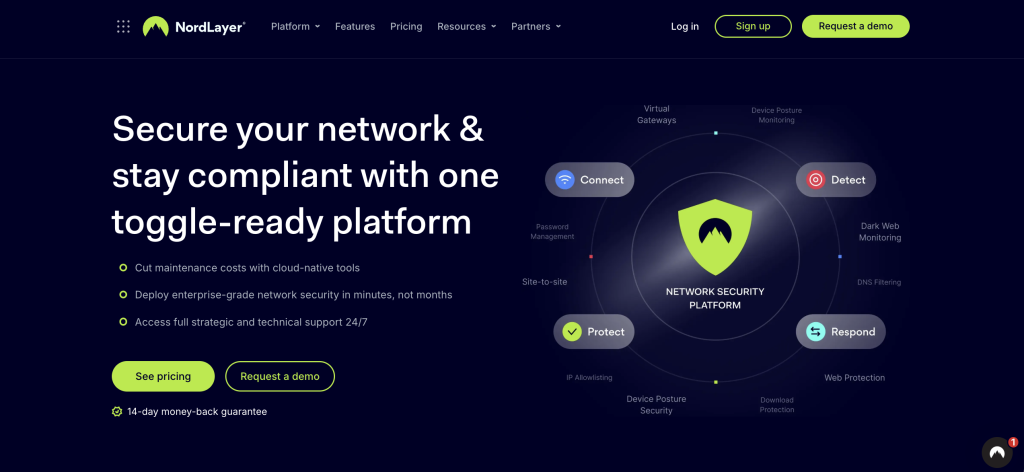
NordLayer delivers a comprehensive business VPN built around zero trust principles and centralised IT control. For Brisbane SMBs that need robust security without building infrastructure from scratch, it strikes the strongest balance between protection and manageability.
Security features
NordLayer offers AES-256 encryption (with ChaCha20 for mobile), always-on VPN enforcement, DNS filtering, malicious website blocking, and threat protection. Its NordLynx protocol, derived from WireGuard, provides strong download speed performance while maintaining encryption standards.
NordLayer offers a centralized control panel for IT management, making it straightforward for Brisbane SMB administrators to manage access, enforce policies, and monitor usage.
Identity and access management
NordLayer integrates with Microsoft Entra ID (Azure AD), Google Workspace, Okta, and other identity providers via SAML and SSO. This means your existing Microsoft 365 user directory can drive VPN access, simplifying onboarding and offboarding.
Multi-Factor Authentication (MFA) adds an extra layer of security for VPN access, and NordLayer supports this natively.
Network capabilities
Site-to-site connectivity through Cloud LAN and private gateway options lets businesses connect offices across Brisbane, Gold Coast, and Sunshine Coast into a secure network.
Dedicated static IP addresses are essential for businesses restricting access via IP allowlisting, and NordLayer offers these at higher tiers.
Split tunneling allows business traffic to use a secure VPN connection while non-sensitive traffic runs through a local internet connection, reducing unnecessary load on VPN infrastructure.
Pricing
The Lite plan starts at approximately USD $8/user/month with a 5-user minimum. Core and Premium tiers add dedicated IPs, private gateways, advanced threat protection, and enhanced SLAs. A 14-day money-back guarantee provides a low-risk evaluation window.
Nord Security has also partnered with CrowdStrike to integrate endpoint protection capabilities, expanding the security products available through the platform.
Brisbane fit
With server presence in Sydney and the ability to deploy regional private gateways, NordLayer provides acceptable latency for Queensland users.
The intuitive admin panel suits businesses without large dedicated IT teams, and for those wanting fully managed deployment, providers like XCD IT in Brisbane can handle configuration, identity integration, and ongoing monitoring.
2. Surfshark Business – Best Value for Small Teams

Surfshark for Teams offers the most cost-effective entry point for Brisbane startups and small businesses that need reliable remote access without enterprise-tier complexity.
Cost structure
Starter Team pricing (5-20 seats) runs approximately USD $5.99/seat/month, dropping to roughly USD $4.49/seat/month at the Business tier (20-100 seats). Enterprise pricing is available for larger deployments.
This makes Surfshark notably cheaper per seat than competitors, meaningful for budget-conscious midsize businesses and small office environments.
Security and feature
Surfshark provides AES-256 encryption across WireGuard, OpenVPN, and IKEv2 protocols. The VPN client includes a kill switch, split tunneling (called “Bypasser”), rotating IP addresses, and CleanWeb, which blocks ads, trackers, and phishing attempts.
Unlimited device connections per user account means employees can secure laptops, phones, and tablets without additional licensing.
Infrastructure
Surfshark operates over 4,500 servers across 100+ countries, including several in Australia.
The Everlink feature provides self-healing routes that automatically reroute connections around failures, valuable in Australia where internet backbone distances create routing challenges. FastTrack reduces latency through optimised path selection.
These infrastructure features help during failover events and support business continuity for operations that depend on consistent connectivity.
Limitations for Brisbane SMBs
Lower tiers may not include full business security features like SCIM provisioning, dedicated gateway access, or advanced audit logging.
For businesses in regulated industries, healthcare, legal, financial services, the audit and compliance capabilities at entry-level pricing may be insufficient. Static IP and SSO unlock at higher tiers, increasing total cost for businesses that need these features.
Brisbane fit
Surfshark’s large server network includes Australian presence, and routing optimisations through Everlink and FastTrack help reduce latency. For a Brisbane startup with 10-15 employees using SaaS tools, this VPN service provides strong baseline security at a price point that doesn’t strain early-stage budgets.
3. OpenVPN CloudConnexa – Best for Customization
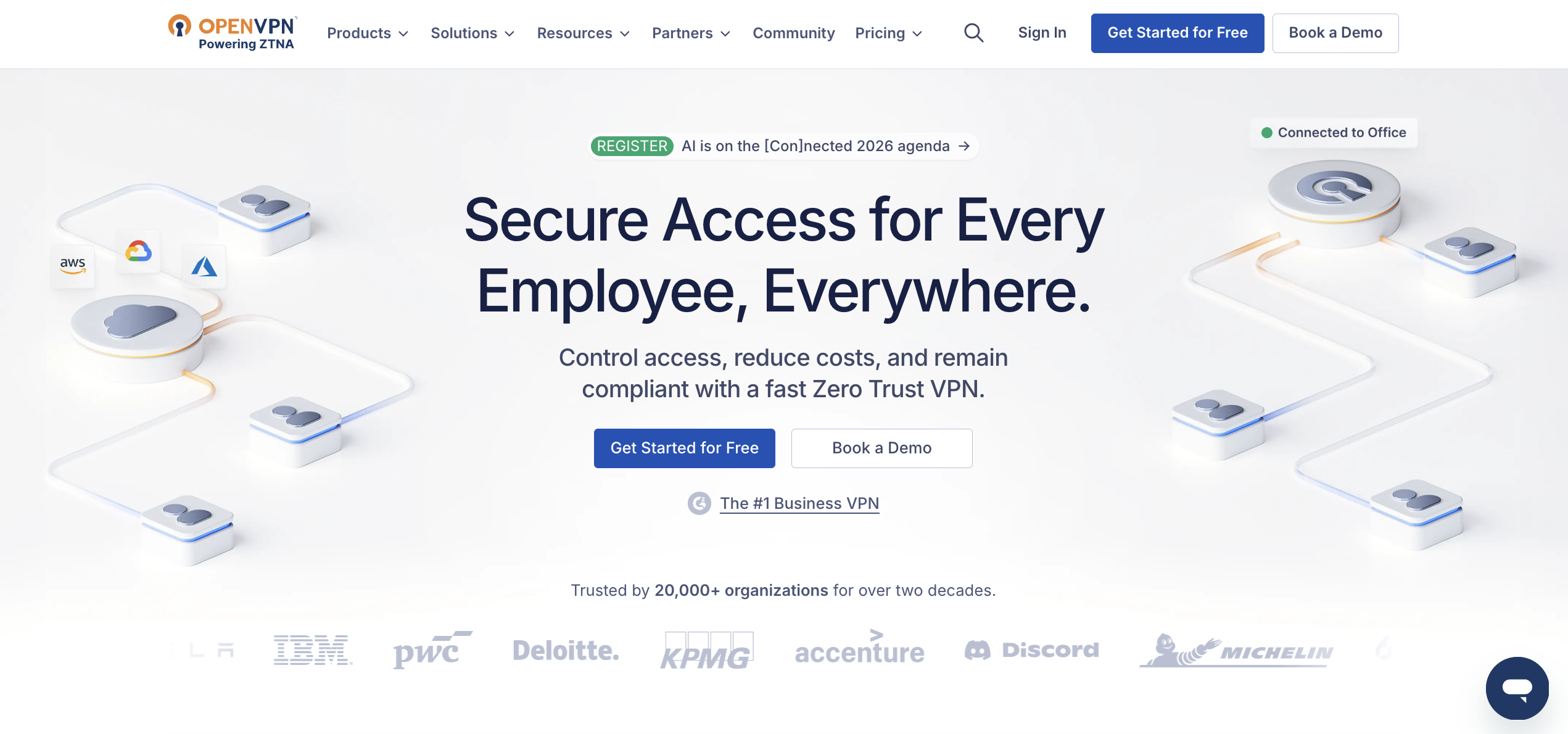
OpenVPN CloudConnexa is a cloud-delivered secure networking service with built-in ZTNA and security service edge (SSE) capabilities.
It creates a Wide-area Private Cloud (WPC) overlay network across 30+ points of presence worldwide, making it the most architecturally flexible option for Brisbane businesses with complex requirements.
Security and access controls
CloudConnexa includes continuous device posture enforcement, verifying OS version, antivirus status, and disk encryption before granting access.
OpenVPN supports Zero Trust security with device posture checks, location context policies, and granular per-group access rules.
Built-in IDS/IPS (CyberShield) and content filtering across 40+ categories provide network-level threat protection. LDAP, SAML, and SCIM support handles identity management, with MFA and passkey authentication available.
Networking and routing
CloudConnexa supports both OpenVPN and IPsec protocols, with kernel-space Data Channel Offload (DCO) for improved encryption throughput.
Domain-based routing lets administrators specify exactly which traffic flows through the VPN, a more granular approach to split tunneling that keeps business traffic secure while allowing non-sensitive browsing to route directly.
Multi-site connectivity
For businesses operating across multiple Brisbane locations, CloudConnexa’s Connector architecture allows deploying software routers at each site to form a full-mesh network.
This is particularly valuable for businesses with a Brisbane office plus locations on the Gold Coast or Sunshine Coast that need site-to-site connectivity.
The platform also supports IoT device connectivity, useful for businesses with POS terminals, security cameras, or sensor networks that need secure connections.
Pricing
A free Starter plan covers up to 5 seats, genuinely useful for micro-businesses or evaluation.
The Essential plan runs approximately USD $7/seat/month billed annually, while Premium (at ~USD $9.50/seat/month) adds SCIM, expanded authentication options, longer log retention, a dedicated account manager, and a 99.9% SLA.
Self hosted VPN alternative
For businesses requiring data sovereignty or maximum control, OpenVPN’s underlying technology can also be deployed as a self hosted VPN on local infrastructure or Australian cloud instances, an option unavailable with NordLayer or Surfshark.
Brisbane fit
CloudConnexa’s Connector-based architecture works well for multi-location businesses, and its granular security controls suit regulated industries.
The trade-off is complexity: configuration of routing rules, connectors, and identity integration requires more technical expertise than NordLayer or Surfshark. This is where working with a Brisbane-based cybersecurity partner adds significant value.
Are These VPN Providers Actually Set Up for Australian Businesses?
Yes, but with three caveats worth knowing before you sign up. All three providers are usable by Australian businesses today: none are geo-restricted, and each maintains server presence in Sydney for lower latency. That said, none of them are Australian companies, and none offer a fully local buying experience.
- Billing is in USD, not AUD. All three price in US dollars. Your card issuer or business account will handle the currency conversion, so budget for exchange rate movement and any foreign transaction fees, not just the sticker price.
- No Australian entity or local support team. NordLayer and Surfshark are part of the Nord Security group (Lithuania/Netherlands), and OpenVPN is US-based. Support is via global live chat and email, generally responsive by review accounts, but there’s no Brisbane or Sydney office and no phone support in your timezone.
- Sydney servers are a data centre, not a local presence. Having a server in Sydney improves latency for Australian users, but it doesn’t mean local account management, contracts under Australian law, or a business contact who understands South East Queensland’s operating environment.
None of this rules these providers out. It’s standard for global SaaS security tools, and it’s the exact reason this guide recommends pairing whichever VPN you choose with a local Brisbane partner like XCD IT: the vendor handles the software, and the local partner handles setup, ongoing support, and the accountability of a business you can actually call.
Understanding Business VPNs for Brisbane SMBs
A business VPN creates an encrypted tunnel between employee devices and company resources, whether those resources sit in a Brisbane office server room, in Microsoft 365, or across multiple cloud systems.
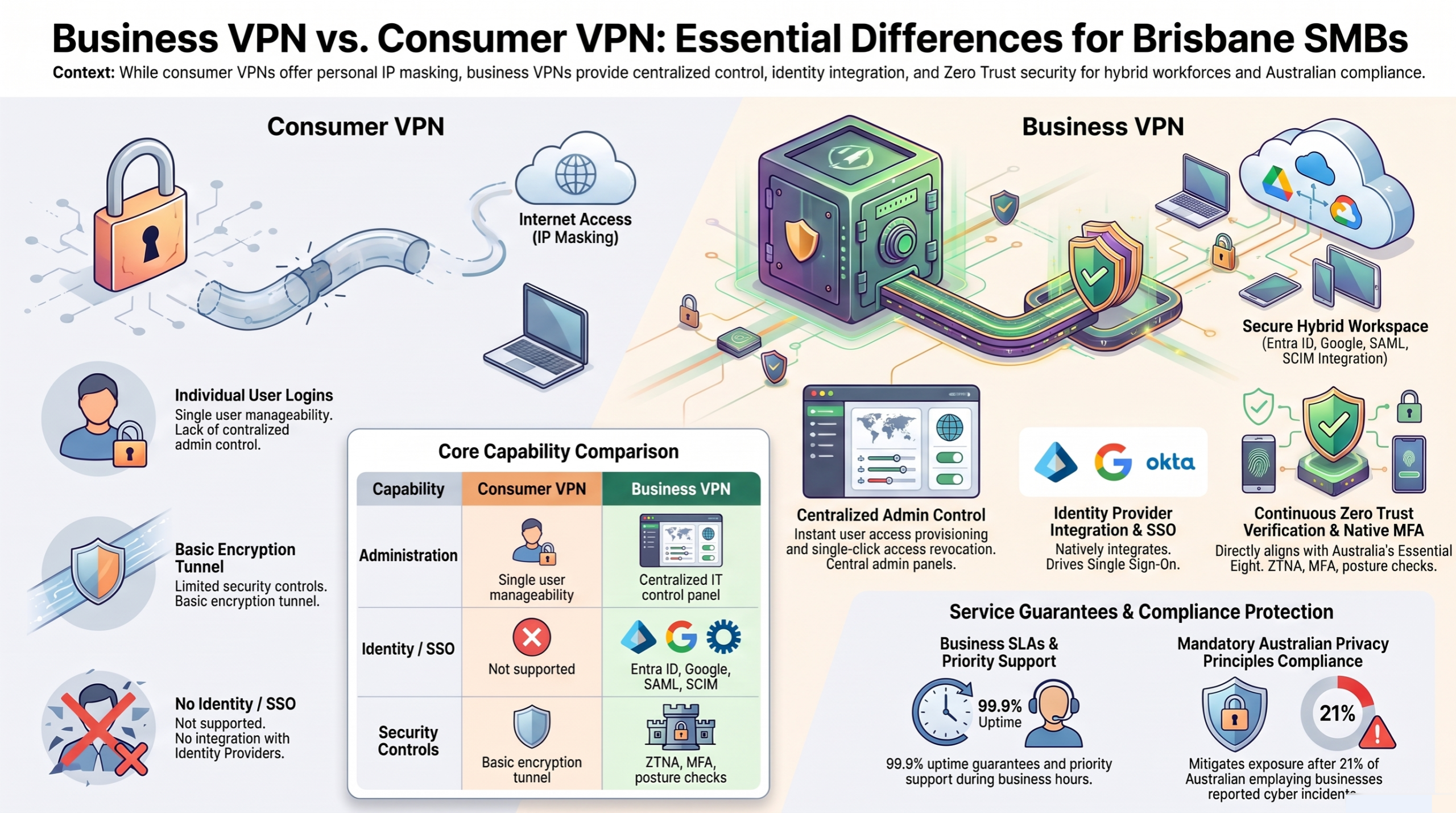
Unlike consumer VPNs designed primarily for personal privacy, a business VPN provides centralized administration, enforceable security policies, identity provider integration, and audit logging that organisations need to protect sensitive client and operational data.
For Brisbane businesses navigating hybrid work arrangements, cloud adoption, and increasing cyber security threats, a business VPN is foundational infrastructure, not optional software.
With 96% of Australian businesses using the internet in 2023 and the shift to remote access showing no signs of reverting, securing that connectivity is a baseline requirement.
Why Brisbane SMBs Need Business VPNs
Remote and hybrid work has become permanent across most Brisbane businesses.
Australian Government data shows remote work jumped sharply in the years following 2020, and those arrangements have become embedded in how SMBs operate, particularly across professional services, legal, financial, and healthcare sectors in the Brisbane metro area.
The security implications are significant. ABS statistics from the 2024-25 financial year reveal that 21% of Australian employing businesses reported experiencing a cyber security incident, with 36% suffering loss of time, 18% financial loss, and 17% experiencing operational downtime.
IBM’s 2026 Cost of a Data Breach Report puts the average cost of an Australian data breach at AUD $4.22 million, a figure that can ruin small businesses outright.
Brisbane SMBs face specific exposure points:
- Public Wi-Fi risk: Staff working from cafés, co-working spaces, and client sites across Brisbane, Gold Coast, and Sunshine Coast connect through unsecured networks. VPNs encrypt traffic to protect sensitive data from interception, making data incomprehensible if intercepted.
- Compliance obligations: Healthcare, legal, and financial services businesses must comply with Australian Privacy Principles (APPs) when handling personal data. Secure VPN solutions are critical for SMBs handling sensitive client data.
- Multi-location connectivity: Businesses with multiple Brisbane locations or satellite offices on the Gold Coast need secure network connections between sites. A single unprotected connection is a single point of failure for businesses.
- Cloud application security: Most Brisbane businesses now rely on Microsoft 365, cloud-hosted accounting software, and SaaS CRMs. Reliable remote access to these cloud apps requires secure, managed connectivity, not security bolted on as an afterthought.
Cybersecurity measures help prevent ransomware and phishing attacks, and Infoblox’s State of Security report found that approximately 55% of Australian organisations deployed VPNs or firewalls specifically to address remote workforce security challenges.
Business VPN vs Consumer VPN Differences
The distinction between consumer and business VPN products matters significantly for operational security. Administrative controls for user management are necessary for businesses with multiple employees, something consumer VPNs simply do not provide.
Centralized management and user provisioning
A business VPN gives IT administrators an admin panel to add, remove, and manage users across the organisation. When an employee leaves, their access is revoked immediately from a single dashboard. Centralized administration is important for managing user access in SMBs, particularly where no dedicated internal person handles IT full-time.
Identity provider integration
Business VPNs integrate with Microsoft 365, Azure Active Directory (Entra ID), Google Workspace, and Okta, allowing single sign-on and automated provisioning. Consumer VPNs offer none of this. A business VPN should support modern protocols like OpenVPN and integrate with your existing identity infrastructure.
Service level agreements and business-grade support
VPN providers at business tiers offer uptime guarantees (commonly 99.9%), priority support during business hours, and dedicated account management. Consumer VPNs provide general support queues with no SLA.
Advanced security features
Site-to-site connectivity, conditional access policies, device posture checks, split tunneling controls, static IP assignments, and threat filtering distinguish business offerings.
Zero Trust Network Access (ZTNA) is becoming a preferred model for modern VPNs, verifying identity and device health continuously rather than granting blanket access after initial login.
VPNs should offer multi-factor authentication for enhanced security, a requirement also embedded in Australia’s Essential Eight framework, which includes Multi-Factor Authentication (MFA) as a primary requirement.
These capabilities make business VPNs the correct choice for any SMB where security, compliance, or operational control matters, which, realistically, means every Brisbane business with employees accessing systems remotely.
Implementation and Setup for Brisbane Businesses
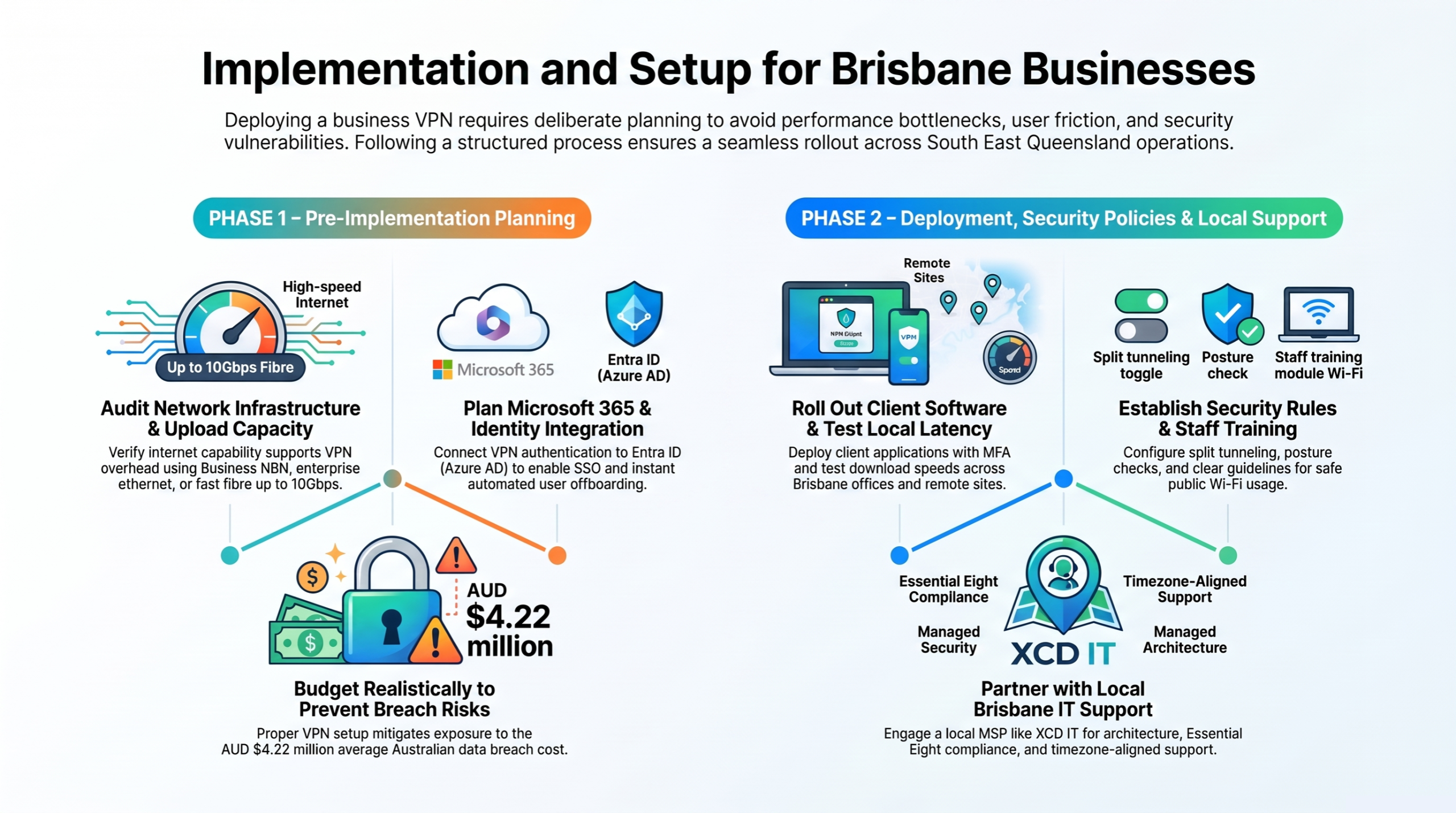
Deploying a business VPN across your Brisbane operations requires deliberate planning. Technology decisions made during setup determine long-term security posture, user experience, and operational overhead. Rushing deployment typically leads to performance problems, user resistance, and security gaps that undermine the investment.
Pre-Implementation Planning
Before configuring any VPN service, complete these foundational assessments:
Audit your network infrastructure
Evaluate your business internet capacity at each location. Business NBN is designed for reliability and speed for commercial use, and standard residential connections may not provide adequate upload bandwidth for VPN traffic.
Enterprise ethernet offers dedicated, symmetrical speeds for businesses running heavy workloads. Fast fibre can provide speeds up to 10Gbps for data-intensive operations, while fixed wireless can be a solution where fixed-line options are impractical.
Poor connectivity can disrupt payroll and client communication, so ensure your upstream connection supports the additional overhead before deploying VPN. A single connection is a single point of failure for businesses, so consider redundant internet connections at critical sites.
Map user access requirements
Identify which employees need remote access, what specific resources they access (on-premises servers, cloud apps, remote desktop sessions), and from where. Most of your systems likely have cloud components that interact with VPN routing.
This mapping directly informs your split tunneling configuration and conditional access policies. The same resource map is also useful when moving offices, since staff locations, site connectivity, and access paths often change at the same time.
Plan identity integration
If your business uses Microsoft 365, confirm your VPN choice integrates with Entra ID for SSO and automated provisioning. This eliminates duplicate user management and ensures that when someone leaves, VPN access is revoked through the same process as email access.
Budget realistically
Model per-user costs over 12-24 months, but assess continuity and performance before price, not the other way around, including base subscription, add-ons (static IP, dedicated gateways), and any managed services fees.
Convert USD vendor pricing to AUD with GST consideration. Compare this against the cost of a potential breach, since VPNs can help reduce the risk that contributes to the average AUD $4.22 million cost of an Australian data breach.
Step-by-Step Deployment Process
Configure VPN service and create user accounts
Set up your chosen VPN provider’s admin console, establish security policies, configure multi factor authentication requirements, and create user groups based on access needs. Define which connection types each group uses and what resources they can reach.
Install VPN client software on business devices
Deploy the VPN client to all company-managed laptops, desktops, and mobile devices. For businesses using endpoint protection or managed firewall solutions, verify compatibility. Configure always-on VPN policies for devices that regularly handle sensitive data.
Test connectivity and performance from Brisbane locations
Run tests from actual Brisbane locations, your Brisbane office, home offices, and common remote work sites. Measure download speed through the VPN tunnel, test latency to your primary cloud systems, and verify that video calls and Teams calling function without degradation. Check performance during peak hours to identify potential bottlenecks.
Implement security policies and access controls
Configure split tunneling rules so business traffic routes through the encrypted tunnel while non-sensitive browsing goes direct. Set up device posture requirements, IP allowlisting if using static IPs, and content filtering. Establish conditional access policies that restrict access based on device health and location.
Train staff and establish usage guidelines
Provide clear documentation on when and how to use the VPN, particularly around public Wi-Fi network usage and cybersecurity best practices. Create a simple usage policy: employees should understand that VPN protects company data and is not optional for remote access to business systems. Staff guidance should also cover what to do during outages or ransomware incidents so the VPN process supports broader disaster recovery and business continuity plans.
Professional Setup with XCD IT
Local Managed Service Providers can assist SMBs with maintaining cloud-managed VPNs, and for Brisbane businesses that lack dedicated IT staff, professional deployment eliminates configuration errors and accelerates time-to-security.
XCD IT provides managed IT services across Brisbane, Gold Coast, and Sunshine Coast, including VPN deployment as part of broader cyber security and network management engagements. Their Brisbane based team handles:
Architecture design
Selecting the right VPN provider based on your specific requirements, designing gateway placement, configuring split tunneling rules, and optimising routing for your locations. This includes assessing whether your business internet infrastructure supports VPN overhead or needs upgrading, whether that means business NBN, dedicated fibre, or enterprise ethernet.
Identity and security integration
Connecting your VPN to existing Microsoft 365 tenant, configuring SSO, deploying multi factor authentication, and establishing conditional access policies that align with frameworks like the Essential Eight. If Microsoft 365 is also part of your setup, see our guide to choosing an IT partner for Microsoft 365 strategy and cybersecurity planning.
Ongoing monitoring and support
Through their managed services support model, XCD IT provides proactive monitoring of VPN health, connection logs, and security events. Their Brisbane based helpdesk offers remote support and desk support during business hours, with escalation paths for critical incidents. This ongoing support operates on a fixed monthly fee rather than a break fix billing model.
Compliance alignment
For healthcare, legal, and financial services businesses, XCD IT ensures VPN configuration meets compliance with Australian Privacy Principles and industry-specific obligations, including cybersecurity for financial advisers and cybersecurity for legal compliance requirements.
The benefit of working with a local team rather than relying solely on vendor remote support is responsiveness: VPN issues affecting your entire workforce need resolution within your timezone, by people who understand Brisbane’s business environment and common infrastructure patterns.
Your business depends on connectivity, and having a local IT company that provides helpdesk support and understands your environment makes the difference between minutes of downtime and hours.

Need Reliable IT Without the Surprise Costs?
With XCD IT, you get fully managed IT support for around $100–$250/month per user, with no hidden costs or unexpected bills.
Call 07 3085 7447
For urgent IT issues or immediate assistance
Our support team is ready to help.
Common Challenges and Solutions for Brisbane SMBs
Even well-chosen VPN solutions encounter operational friction. These are the most frequent issues Brisbane businesses face and the practical solutions that resolve them.
Slow Performance During Peak Hours
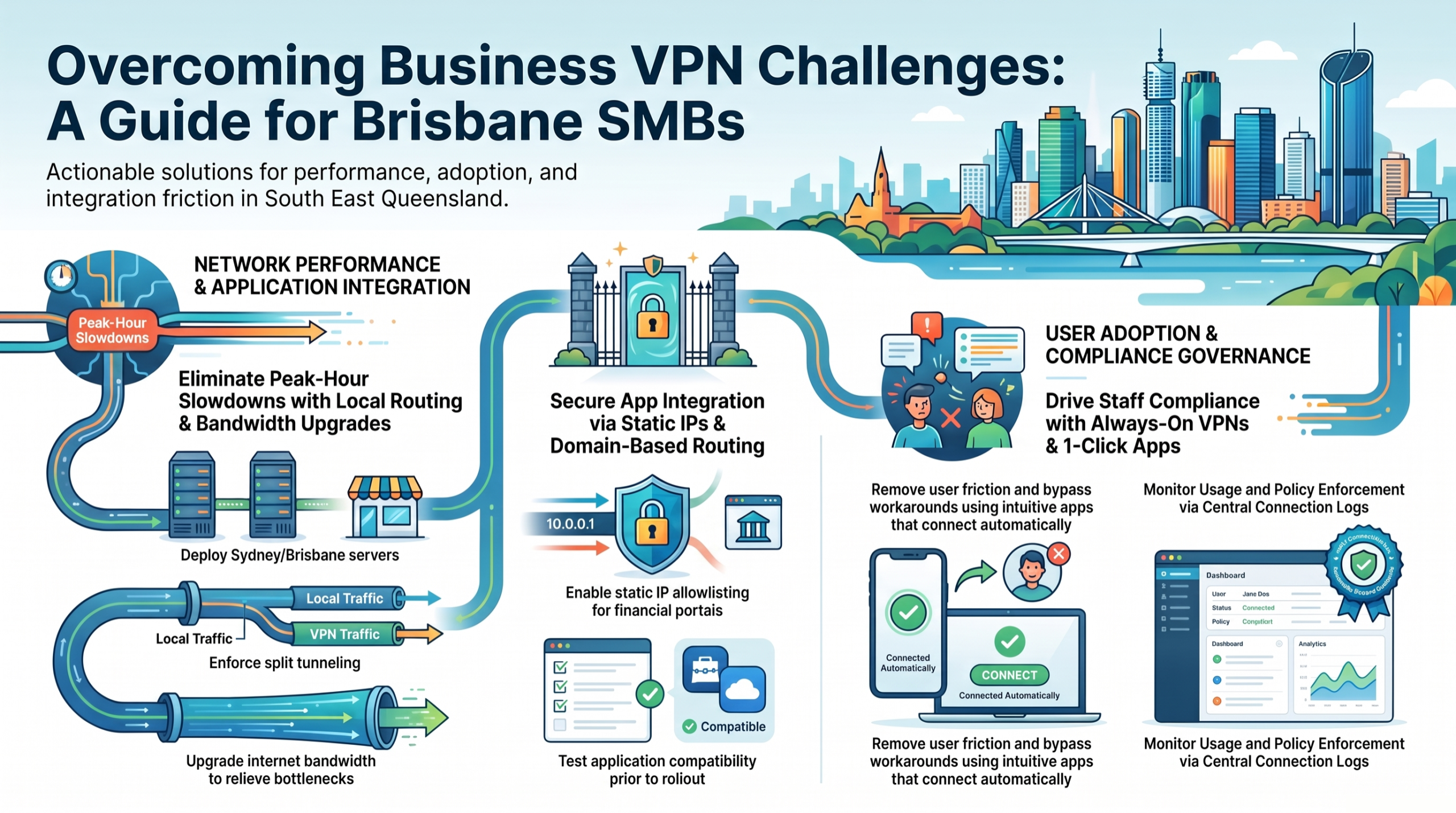
VPN performance degrades when too many users route all traffic through a distant gateway, or when the underlying business internet connection lacks sufficient bandwidth for encrypted overhead.
Choose VPN providers with Brisbane or Sydney server locations. All three recommended providers have Australian presence, but verify latency from your actual locations. Implement split tunneling aggressively: route only business traffic through the VPN while allowing non-sensitive browsing to flow directly through the local internet connection.
For businesses transferring large files or running remote desktop sessions, consider whether your connection type supports the throughput needed.
Monitor bandwidth utilisation and consider upgrading to business-grade connections with dedicated bandwidth and priority fault resolution.
Surfshark’s Everlink and FastTrack features, CloudConnexa’s full-mesh PoP architecture, and NordLayer’s Cloud LAN all provide routing optimisation that helps, but they cannot compensate for inadequate upstream bandwidth.
User Adoption and Compliance
If VPN connections are slow or require complex manual steps, employees will find workarounds: connecting to cloud apps directly, using personal devices without the VPN client, or simply forgetting to connect when working from a café.
Deploy always-on VPN policies that activate automatically when devices leave trusted networks. Choose providers with intuitive one-click connection apps; NordLayer and Surfshark both excel here. Provide clear, simple training during rollout: focus on when the VPN must be active and why it matters, not technical details employees don’t need.
Establish password managers as standard alongside VPN deployment to reduce authentication friction. Regular reminders through internal communications and proactive monitoring of connection logs help maintain compliance.
Your VPN provider’s admin panel should show which users are connecting consistently and which are not.
Integration with Business Applications
Brisbane SMBs commonly report issues where VPN connections conflict with Microsoft 365 services, accounting platforms, CRM systems, or hosted services, triggering additional MFA prompts, geo-IP blocks, or session timeouts.
Test VPN compatibility with all critical applications before full rollout. Configure domain-based routing (available in CloudConnexa) or application-specific split tunneling to ensure business traffic to known SaaS endpoints routes appropriately.
Dedicated static IP addresses are essential for businesses restricting access via IP allowlisting; if your accounting platform or banking portal uses IP-based access controls, configure your VPN to present a consistent exit IP.
Work with your IT partner to configure firewall rules and access policies properly. For businesses using other services like VoIP phone systems or remote desktop connections, ensure those protocols receive appropriate priority and routing through the VPN configuration.
Conclusion and Next Steps
NordLayer, Surfshark Business, and OpenVPN CloudConnexa represent the best business VPNs for Brisbane SMBs in 2026, each addressing different operational realities. NordLayer provides the strongest managed security for medium businesses with compliance requirements.
Surfshark Business delivers the best value for budget-conscious small businesses and startups. OpenVPN CloudConnexa offers unmatched customisation for multi-site businesses and those requiring data sovereignty through self hosted VPN options.
With 96% of Australian businesses using the internet and the threat landscape continuing to intensify, delaying VPN deployment means every remote connection, every public Wi-Fi session, and every cloud application login remains an exposure point for your business.
Start by assessing your current security posture, trial your preferred VPN using a free tier or money-back guarantee with real Brisbane endpoints, measure performance under actual business conditions, and engage a Brisbane IT specialist like XCD IT for a no-obligation quote on professional implementation and ongoing management.
Frequently Asked Questions

- 8+ Best Cybersecurity Companies in Brisbane (2026 Guide for SMBs) - November 7, 2026
- 20 Best Managed IT Service Companies in Brisbane (2026 Guide for SMBs) - November 7, 2026
- Co-Managed IT: How It Works With Your In-House IT Team - November 4, 2026


