
Consent phishing is now one of the most dangerous threats facing Microsoft 365 businesses in Australia – and unlike traditional phishing, it bypasses passwords and MFA entirely.
Most business owners in Brisbane have heard of phishing. The classic version has been around for decades, and MFA was supposed to be the final nail in its coffin. It wasn’t. Attackers have evolved, and a newer class of attack – consent phishing and its close cousin, OAuth device code phishing – tricks your staff into handing over something more valuable than a password: direct, persistent access to your Microsoft 365 environment through legitimate authentication mechanisms.
This guide explains exactly how both attacks work, documents the specific campaigns targeting Australian businesses right now, and sets out what Brisbane SMBs need to do to protect themselves.
What Is Consent Phishing?
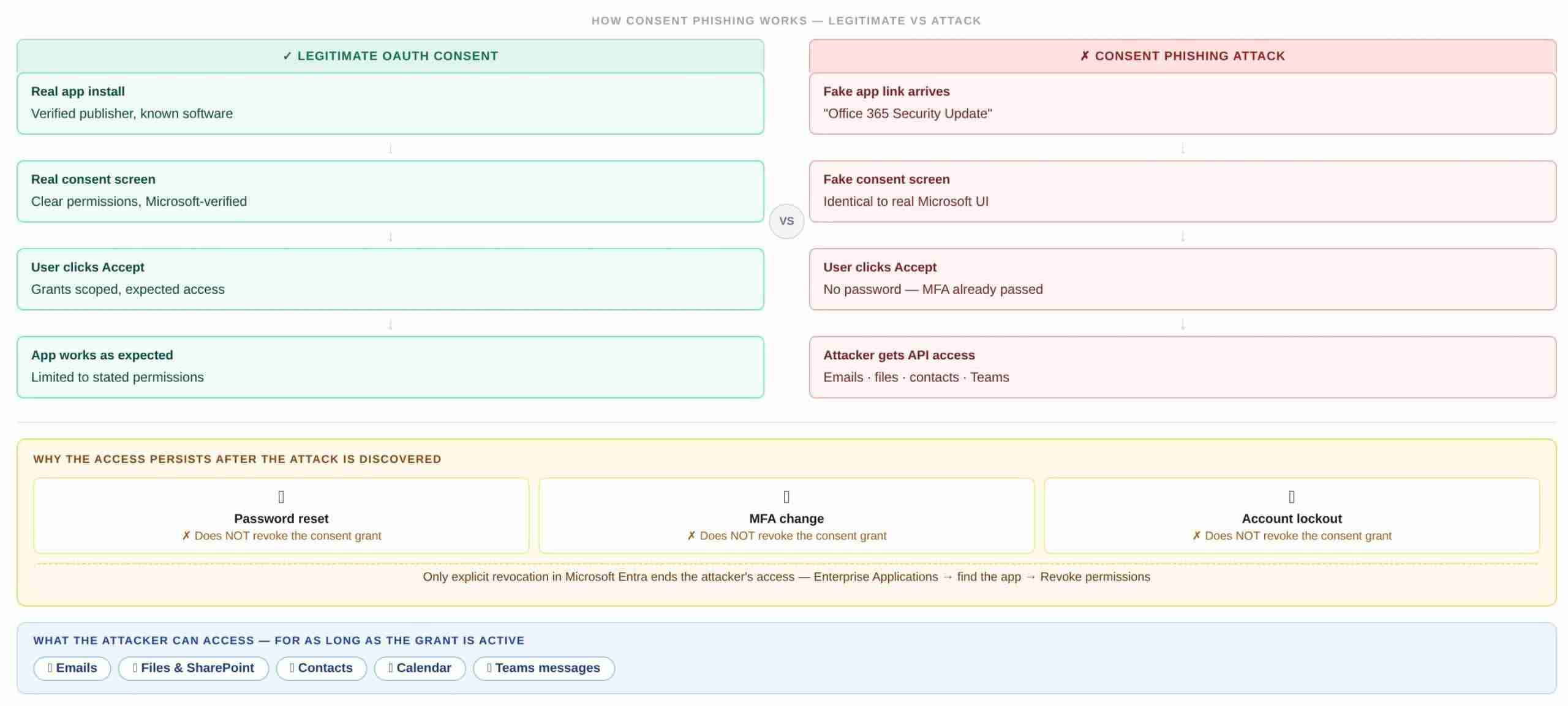
To understand consent phishing, you need to understand how modern cloud applications request access to your data.
When you install a legitimate third-party app that integrates with Microsoft 365 – a project management tool, a CRM, a document signing service – it asks you to “consent” to a set of permissions. A screen appears listing what access the app is requesting: “This app would like to read your emails” or “This app would like to access your files.” You click Accept, the app gets the access it needs, and everything works.
This process is called OAuth consent. It’s a legitimate, widely used authentication standard. The problem is that attackers have learned to abuse it.
How Does Consent Phishing Affect Microsoft 365
In a consent phishing attack, an attacker registers a malicious application – often with a convincing name like “Microsoft Teams File Sync” or “Office 365 Security Update” – and sends a target a link to a fake OAuth consent prompt. The prompt looks identical to a legitimate Microsoft permissions screen. When the user clicks Accept, they haven’t given away their password. They’ve granted the attacker’s application persistent, API-level access to their Microsoft 365 account.
That access survives password resets, MFA changes, and even account lockouts – because it was granted through a legitimate channel.
The attacker now has ongoing access to emails, files, contacts, calendar entries, and Teams messages for as long as the consent grant remains in place.
What Is OAuth Device Code Phishing?
OAuth device code phishing is a related but distinct technique that has surged sharply in 2025 and into 2026. It abuses a legitimate Microsoft authentication feature designed for devices that can’t display a browser – smart TVs, printers, command-line tools – called the device code flow.
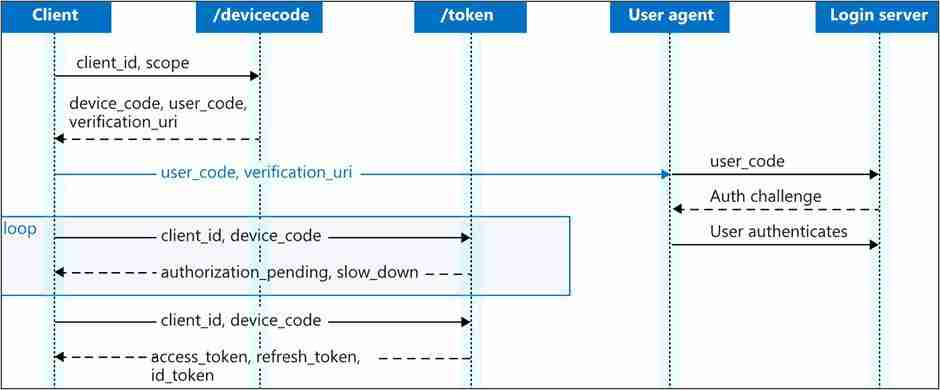
How does OAuth device code phishing work?
Here’s the attack step by step:
- The attacker initiates a request to Microsoft’s device authorisation endpoint, which generates a short user code (e.g. ABCD-1234) and a verification URL (microsoft.com/devicelogin)
- The attacker sends the victim a convincing email containing the user code – a fake security alert, a document share notification, a salary report, a Teams meeting invitation
- The victim navigates to the genuine Microsoft login page, enters the code, and authenticates normally – including completing MFA if prompted
- The attacker receives a valid access token for the victim’s Microsoft 365 account, without ever seeing their password or being involved in the authentication step
The particularly insidious aspect of this attack is that the victim interacts with a genuine Microsoft URL. Everything looks legitimate – because technically, it is. The only fraudulent element is the reason the attacker gave the victim to enter the code.
Why doesn’t MFA stop device code phishing?
Because the victim completes MFA themselves, as part of the normal authentication step. The attacker simply receives the resulting access token. MFA verifies that the person entering the code is who they say they are – it doesn’t verify why they’re entering the code.
Real Attacks Targeting Microsoft 365 Businesses Right Now
These are not theoretical scenarios. The following attacks have been documented by major security researchers in 2025 and 2026.
The Salary Document Campaign (December 2025)
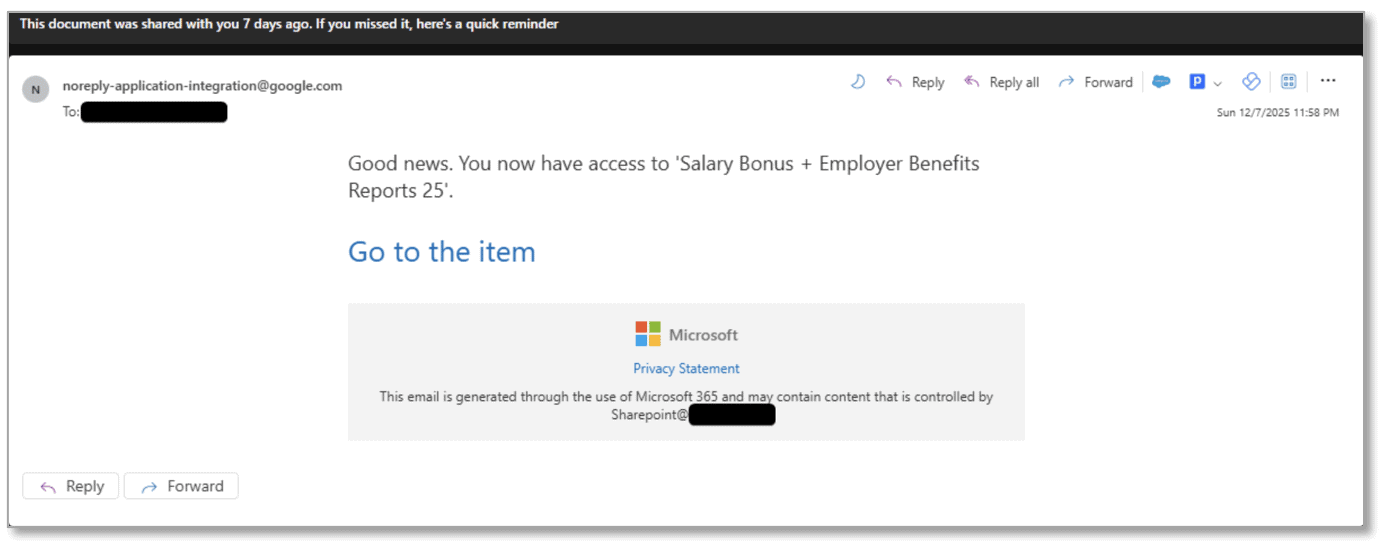
In December 2025, a financially motivated threat actor tracked as TA2723 deployed device code phishing campaigns that spoofed salary documents and shared files. One campaign used a fake shared document titled “Salary Bonus + Employer Benefit Reports 25,” directing victims to localised websites branded to match their organisation, where they were prompted to enter a device code on Microsoft’s genuine login page – inadvertently granting attackers access to their Microsoft 365 accounts.
This lure works precisely because it’s plausible. A staff member receiving what appears to be a salary document share from HR has every reason to follow the prompts.
The Russia-Aligned State Actor Campaign (2025–2026)
Since September 2025, Proofpoint has tracked a suspected Russia-aligned threat actor (UNK_AcademicFlare) abusing OAuth device code authorisation for account takeover. The actor used compromised government and military email accounts to build rapport with targets before sharing links that spoofed OneDrive, leading victims into a device code phishing workflow. Activity primarily targeted government, academic, think tank, and transportation sectors in the US and Europe.
What makes this campaign particularly sophisticated is the deliberate relationship-building phase – sending an innocuous, legitimate-seeming email first to establish trust, then following up with the malicious link.
The Meeting Invitation Device Registration Attack (April 2025)
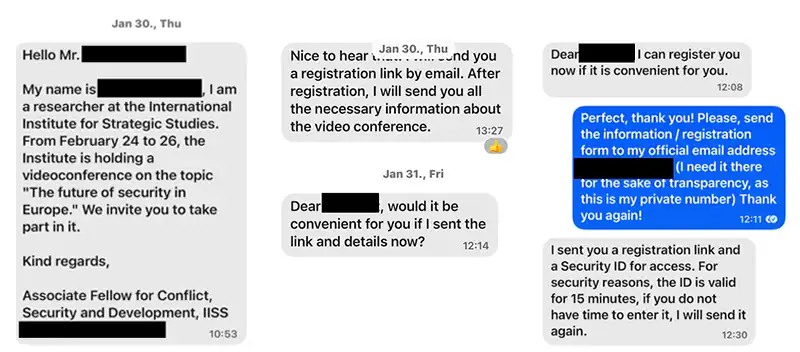
Since April 2025, Microsoft has observed suspected Russian-linked threat actors using third-party application messages referencing upcoming meeting invitations to deliver a malicious link containing valid authorisation code. When clicked, the link returned a token for the Device Registration Service, allowing the attacker to register a device to the victim’s Microsoft tenant.
This variant goes further than account access – it gives the attacker persistent presence in the tenant that survives credential changes entirely.
ConsentFix: The Copy-Paste Account Takeover (December 2025)
Push Security researchers uncovered a browser-native attack dubbed ConsentFix that enables full Microsoft account takeover without capturing a password or triggering MFA – by tricking the victim into copying and pasting a URL.
The attack works by tricking the victim into logging into Azure CLI, generating an OAuth authorisation code visible in a localhost URL, then pasting that URL – including the code – into a phishing page. Push Security detected and blocked the attack across multiple customers, confirming active use in the wild.
EvilTokens: Device Code Phishing-as-a-Service (February 2026)
The emergence of the EvilTokens Phishing-as-a-Service platform in February 2026 marked the full commoditisation of device code phishing. What was once the domain of sophisticated state actors is now available as an off-the-shelf tool, accessible to threat actors with no specialist technical knowledge.
Microsoft’s 2025 Digital Defense Report warned that adversaries are increasingly chaining OAuth device code phishing with consent phishing and adversary-in-the-middle techniques, creating layered identity attacks that persist well beyond password resets.
Why These Attacks Are Particularly Dangerous for Australian SMBs
MFA doesn’t stop them
The single most dangerous aspect of consent and device code phishing is that multi-factor authentication – the control most Australian SMBs have implemented as their primary defence against account takeover – provides no protection. The victim completes MFA as normal. The attack succeeds anyway, because the attacker is abusing a legitimate authentication flow, not stealing credentials.
The access persists after the attack is discovered
When a traditional phishing attack steals a password, changing the password ends the attacker’s access. With OAuth consent grants, access persists until the consent is explicitly revoked. Many businesses that have been compromised through consent phishing don’t realise the access grant still exists weeks or months later – continuing to provide the attacker with access to emails, files, and communications throughout that period.
Privacy Act and Notifiable Data Breach implications
For Australian businesses, an OAuth consent grant that exposes client emails, documents, and personal information to an unauthorised third party is a potential eligible data breach under the Notifiable Data Breaches (NDB) scheme. If personal information is accessed or disclosed without authorisation, the business may have notification obligations to both affected individuals and the OAIC – even if the access was granted inadvertently by a staff member.
The average self-reported cost of a single cyber incident is now $56,600 for a small Australian business, and small and medium businesses make up 71 per cent of the ransomware victims named on criminal leak sites. A consent phishing incident that results in a significant data breach will sit at the higher end of that cost range once legal, notification, and remediation costs are included.
How to Protect Your Microsoft 365 Tenant Against Consent and Device Code Phishing
The good news is that Microsoft has introduced controls specifically designed to address these attack patterns. A properly configured tenant is significantly more resistant. Here’s what Brisbane SMBs need to have in place.
1. Restrict User Consent to Third-Party Applications
This is the most impactful single control. From July 2025, Microsoft began enabling a managed consent policy by default that prevents users from consenting to third-party applications accessing their files and sites. Instead, users can request administrators to consent on their behalf through the Admin Consent workflow.
If your Microsoft 365 tenant was configured before July 2025 and hasn’t been reviewed since, this policy may not be active. Check your Entra ID (formerly Azure AD) application consent settings and confirm that user consent to third-party multi-tenant apps is either restricted or requires admin approval.
2. Block Device Code Flow with Conditional Access
The highest-impact control against device code phishing is a Conditional Access policy targeting the Authentication Flows condition with the Device Code Flow option selected, and the Grant action set to Block. Microsoft introduced this policy condition specifically in response to the abuse pattern documented from 2025 onward.
For most Brisbane SMBs, there is no legitimate business reason for staff to use the device code authentication flow. Blocking it via Conditional Access eliminates the attack surface entirely.
3. Audit Existing OAuth Application Consents

If your Microsoft 365 environment has been running for some time without regular security reviews, there may be existing OAuth consent grants that shouldn’t be there. In the Microsoft Entra admin centre, review the list of enterprise applications and OAuth consent grants across your tenant. Revoke any grants for applications that are unrecognised, unused, or hold more permissions than they should.
4. Enable Risk-Based Step-Up Consent
With risk-based step-up consent, Entra ID automatically blocks end users from granting consent to apps considered potentially risky – such as multi-tenant apps without a verified publisher – requiring admin approval instead. This is a valuable catch-all for consent requests that slip through policy gaps.
5. Train Staff on the Specific Threat
Generic phishing awareness training doesn’t cover consent and device code phishing. Staff need to understand specifically that:
- Legitimate Microsoft services and internal IT systems will never ask them to copy and paste a code into a website
- Any prompt to enter a device code or grant permissions to a new application should be verified with IT before proceeding
- Granting permissions to an app is as consequential as handing over a password – more so, because it persists after a password change
6. Monitor for Anomalous Application Activity
Microsoft Defender for Cloud Apps includes OAuth app policies that can alert on unusual application permission grants and anomalous application activity. For Brisbane businesses in regulated industries – finance, real estate, professional services – this monitoring should be active and reviewed regularly.
What to Do If Your Microsoft 365 Tenant Has Already Been Compromised
If you suspect your tenant has been affected by consent phishing or device code phishing, take these steps immediately:
- Audit OAuth consent grants in Microsoft Entra – look for applications you don’t recognise, particularly those with mail read, files read, or contacts permissions
- Review inbox rules across affected accounts – attackers typically set hidden forwarding rules to maintain ongoing email access
- Check for registered devices added to your tenant that you don’t recognise
- Review mail forwarding and delegation settings across all accounts
- Revoke all active sessions for affected users and force re-authentication
- Assess whether personal information was accessed – if client data, employee records, or financial information was exposed, you may have notification obligations under the Notifiable Data Breaches scheme
Frequently Asked Questions
The Bottom Line for Brisbane SMBs
Consent phishing and OAuth device code phishing represent a fundamental shift in how Microsoft 365 accounts are compromised. MFA – the control most Australian SMBs rely on as their primary identity protection – provides no defence.
The access granted persists beyond password resets. And the attack tooling is now available as a commercial service, meaning it’s not just sophisticated state actors running these campaigns.
For Brisbane businesses in finance, real estate, professional services, and other sectors that hold sensitive client data, a properly configured Microsoft 365 environment is a compliance necessity, not just a security best practice.
The controls above are available in every Microsoft 365 tenant – but configuring them correctly requires navigating Microsoft Entra, Conditional Access, and Defender for Cloud Apps in the right sequence. Misconfigured policies can block legitimate workflows or leave gaps that attackers can still exploit.
XCD IT provides Microsoft 365 security reviews for Brisbane SMBs – assessing your consent policies, Conditional Access configuration, existing OAuth grants, and monitoring setup in a single engagement. Contact us here or call 07 3085 7447 to arrange a review.

Need Reliable IT Without the Surprise Costs?
With XCD IT, you get fully managed IT support for around $100–$250/month per user, with no hidden costs or unexpected bills.
Call 07 3085 7447
For urgent IT issues or immediate assistance
Our support team is ready to help.

- 8+ Best Cybersecurity Companies in Brisbane (2026 Guide for SMBs) - November 7, 2026
- 20 Best Managed IT Service Companies in Brisbane (2026 Guide for SMBs) - November 7, 2026
- Co-Managed IT: How It Works With Your In-House IT Team - November 4, 2026


