
Is your Queensland business still relying on individual laptops and desktops to store the data your team works with every day?
If so, you are carrying more risk than you probably realise. Desktop virtualisation for Queensland SMBs has become one of the most practical ways to improve security, simplify IT management, and give your team genuine flexibility without spending more on hardware.
It is also one of the most misunderstood technologies in the small business space, largely because it sounds more complicated than it actually is.
This guide explains what desktop virtualisation is, how it works in practice, what it costs, who it suits, and what your options are if you are already on Microsoft 365.
Key Takeaways: Desktop Virtualisation for Queensland SMBs
- Desktop virtualisation moves your applications and data off individual devices and onto a central server or cloud environment, so staff can log in securely from any device, anywhere.
- If a laptop is lost or stolen, there is nothing sensitive on it to lose. The data stays on the server, not the endpoint.
- Updates, patches, and new software are applied once centrally and roll out to all users simultaneously, which significantly reduces IT management overhead.
- Staff can access their full work environment from home, from a client site, or from any location with an internet connection, without any compromise to performance or security.
- Microsoft 365 users have two strong options built into the platform: Azure Virtual Desktop for scalable, consumption-based hosting, and Windows 365 for a simpler fixed-cost Cloud PC model.
- Desktop virtualisation is particularly well suited to industries with data security obligations, including real estate, finance, legal, accounting, and healthcare.
- The total cost of ownership is often lower than traditional desktops once reduced hardware spend and IT management time are factored in.
- Migration for a small team can typically be completed in a few weeks with minimal disruption to daily operations.
What Is Desktop Virtualisation?
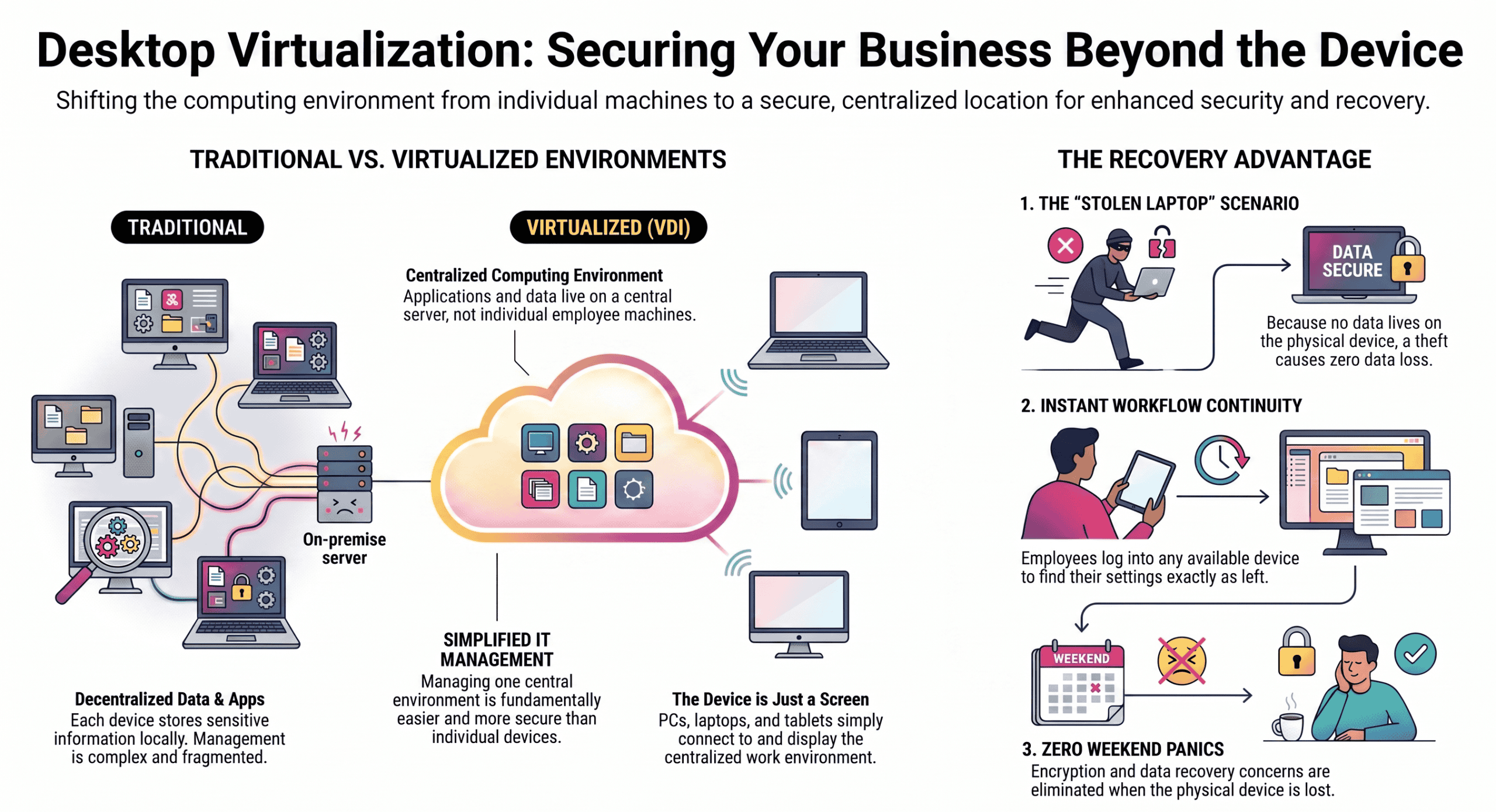
Desktop virtualisation, also called VDI or Virtual Desktop Infrastructure, moves the computing environment off the physical device and into a server or cloud environment. Instead of your applications and data living on each employee’s individual machine, they live centrally.
The device on the desk, whether it is a PC, thin client, laptop, or tablet, simply connects to that centralised environment and displays it.
From the user’s perspective, it looks and feels like using a normal computer. From an IT and security perspective, it is fundamentally different and far easier to manage.
The simplest way to picture it is this: a staff member’s laptop gets stolen on a Friday afternoon. In a traditional setup, that is a weekend of panic. What data was on it? Was it encrypted? How long until you can get them a replacement and back up and running?
With desktop virtualisation, the answer is straightforward. The data was not on the laptop. The laptop was just a screen. The employee logs into any available device on Monday morning and their full work environment, every file, every application, every setting, is exactly where they left it.
That is the core value of desktop virtualisation, and it is one reason more Queensland SMBs are taking it seriously.
How Does Desktop Virtualisation Actually Work?
Understanding the basic mechanics helps when evaluating whether this approach suits your business. It is less complex than it sounds.
Technical Setup
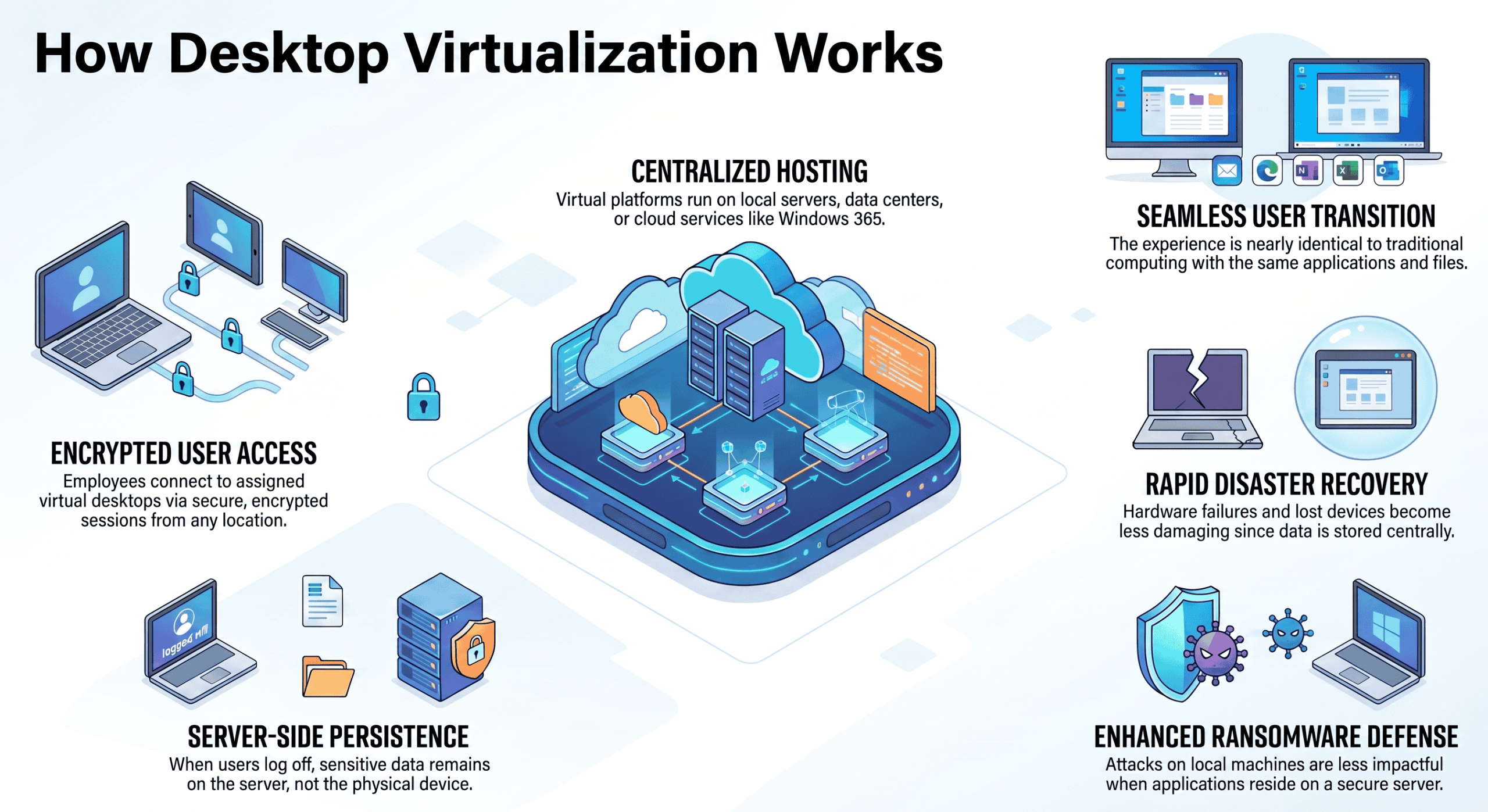
A virtualisation platform, hosted on your own servers, in a data centre, or in the cloud via services like Microsoft Azure Virtual Desktop or Windows 365, runs individual virtual desktop instances for each user. When an employee logs in, they connect to their assigned virtual desktop over an encrypted session. Their desktop, applications, and files appear on screen, and they work as normal.
When they log off, nothing sensitive stays on the physical device. The virtual desktop persists on the server, ready for the next login from any location.
What This Means for Day-to-Day Operations
For most staff, the experience of using a virtualised desktop is nearly identical to using a traditional computer. The applications are the same, the file structure is the same, and the login process takes a few extra seconds at most.
The difference is felt most when something goes wrong. A hardware failure, a lost device, or a ransomware attack that encrypts a local machine all become significantly less damaging when the data and applications are sitting on a server rather than on the affected endpoint.
What Are the Key Benefits of Desktop Virtualisation for Queensland SMBs?
The benefits are practical and measurable. They cover security, flexibility, cost, and IT management, and they tend to compound over time as your business grows.
Security: Data Stays Central and Off the Endpoint
In a traditional environment, data is scattered across dozens or hundreds of individual machines. Losing a laptop means losing whatever was stored on it.
With virtualised desktops, there is nothing on the endpoint device to lose. Security controls, data loss prevention policies, and access management are all applied centrally and consistently across every user.
For Queensland businesses handling sensitive client data in industries like finance, healthcare, legal, real estate, and accounting, this is a significant and measurable reduction in risk. It also simplifies compliance with data security frameworks like the Australian Cyber Security Centre’s Essential Eight, since controls applied to a central environment are far easier to audit and verify than controls applied to individual machines.
Remote Work Without Compromise
Employees can access their full work desktop from home, from a client site, or from anywhere with a reliable internet connection. This is not a stripped-down remote access session or a limited set of files synced to a personal device.
It is their complete work environment, with every application, every file, and every setting, exactly as it would be in the office.
Because the computing happens on the server rather than the device, it works fine even on older or lower-specification hardware. A five-year-old laptop running a virtualised desktop can deliver the same performance as a brand-new machine running applications locally, provided the server infrastructure is appropriately sized.
Simplified IT Management Across Your Whole Team
In a traditional desktop environment, every machine needs to be individually patched, updated, and configured. When a security patch needs to be applied across 30 devices, someone has to touch each one. With virtualised desktops, updates are applied once and propagate to all users simultaneously.
New employees can be provisioned with a full, correctly configured desktop in minutes rather than hours. Departing employees can have their access revoked instantly without needing to physically retrieve a device. The IT management overhead of running a distributed fleet of individual machines is replaced by the far simpler task of managing a centralised environment.
Business Continuity When Your Office Becomes Inaccessible
If your office becomes inaccessible due to a flood, a fire, a burst pipe, or any other event that forces your team to work remotely, a virtualised desktop environment means your team can be working normally from any location within the time it takes them to open a device and log in. The business does not stop because the office is unavailable.
For Queensland businesses in areas that experience flooding or severe weather events, this is not a theoretical benefit. It is a practical continuity consideration that has become more relevant as extreme weather events have become more frequent across South-East Queensland.
Hardware Flexibility and Extended Device Life
Because the computing happens on the server, the devices on desks do not need to be powerful. Older machines, thin clients, and even consumer-grade devices can deliver a full professional experience when they are connecting to a well-configured virtual desktop environment.
This extends the useful life of existing hardware and reduces capital expenditure on endpoint devices. Rather than replacing an entire fleet of laptops every three to four years, businesses can extend device life cycles while still delivering a consistent, up-to-date experience to every user.
How Does Desktop Virtualisation Compare to Traditional Desktops?
Neither approach is universally better. The right choice depends on your workload, your security requirements, your team’s working patterns, and your budget.
Where Traditional Desktops Still Make Sense
Traditional desktops make sense where staff need reliable offline access, work with hardware-specific peripherals that are difficult to virtualise, or run specialist software with requirements that are incompatible with a virtualised environment. Some roles in manufacturing, engineering, and creative production fall into this category.
For most office-based roles in professional services, administration, finance, and property management, these limitations rarely apply.
Where Virtualised Desktops Deliver More Value
Virtualised desktops deliver more value wherever data security, remote access, IT management efficiency, and business continuity matter. For a Queensland SMB with a mix of office-based and remote staff, sensitive client data obligations, and a small internal IT resource, the advantages of a virtualised environment tend to outweigh the limitations significantly.
Some businesses use a hybrid approach, with virtualised desktops for most staff and traditional machines for specific roles that have genuine offline or hardware requirements. This is a practical middle ground that many organisations settle on during or after migration.
Which Queensland Businesses Are Best Suited to Desktop Virtualisation?
Desktop virtualisation tends to deliver the most value for businesses that have staff working remotely or across multiple locations, handle sensitive client or financial data, struggle with IT management overhead across many individual devices, are planning office relocations or significant staff growth, or need to comply with data security frameworks like the Essential Eight.
Industries Where It Makes the Most Difference
It is particularly well suited to industries like finance, mortgage broking, real estate, legal, accounting, and healthcare. Many of these industries have explicit data security and privacy obligations under Australian law, including the Privacy Act 1988 and sector-specific regulatory frameworks, and a virtualised desktop environment is one of the most practical ways to meet those obligations consistently.
For Queensland agencies and practices in these industries, desktop virtualisation is also increasingly relevant as clients and professional indemnity insurers begin asking more pointed questions about how client data is being stored and protected.
Business Size and Growth Stage
Desktop virtualisation is not limited to large businesses. It is well suited to Queensland SMBs from around 5 users upward, and it scales easily as headcount grows.
For businesses planning to add staff, open a second location, or move to a hybrid working model, putting a virtualised desktop environment in place before the growth happens is far simpler than trying to migrate a larger, more complex setup later.
What Microsoft Desktop Virtualisation Options Are Available?
If your business is already on Microsoft 365, two options integrate natively with the platforms you are already using and paying for.
Azure Virtual Desktop
Azure Virtual Desktop, commonly called AVD, is a cloud-hosted VDI solution that runs on Microsoft Azure. It is highly scalable, billed on a consumption basis, and tightly integrated with Microsoft 365, Intune, and Entra ID. It is well suited to businesses with variable or growing headcounts where the number of users changes frequently, since you only pay for what you use.
AVD gives IT administrators fine-grained control over the environment and supports a wide range of configurations, making it a strong choice for businesses with more complex requirements or multiple distinct user groups with different access needs.
Windows 365
Windows 365 is a simpler, fixed-cost Cloud PC model where each user gets a dedicated virtual Windows PC for a set monthly fee. It is easier to understand, easier to budget for, and involves less infrastructure complexity than AVD.
For smaller Queensland SMBs that want the benefits of a virtualised desktop without the complexity of managing a scalable cloud infrastructure, Windows 365 is often the more practical starting point. The per-user monthly cost is predictable, the setup is straightforward, and the experience for end users is nearly identical to using a traditional Windows PC.
Both options are managed through the Microsoft 365 admin centre, sit within Microsoft’s enterprise security framework, and can be configured and monitored by your managed service provider.
How Does XCD IT Help Queensland SMBs with Desktop Virtualisation?
XCD IT designs and manages desktop virtualisation environments for Queensland SMBs. As a Microsoft Partner, we are experienced with both Azure Virtual Desktop and Windows 365, and we help businesses work out which approach suits their team, their budget, and their security requirements.
We handle the setup, the migration, and the ongoing management, so your team gets the flexibility and security benefits without your leadership team needing to understand the underlying technology. We also handle staff onboarding for the new environment, which is one of the steps most commonly underestimated during migration planning.
If you are thinking about remote work capability, a hardware refresh, or tightening your data security posture ahead of a compliance review or insurance renewal, desktop virtualisation is worth a conversation.

Need Reliable IT Without the Surprise Costs?
With XCD IT, you get fully managed IT support for around $100–$250/month per user, with no hidden costs or unexpected bills.
Call 07 3085 7447
For urgent IT issues or immediate assistance
Our support team is ready to help.
Frequently Asked Questions: Desktop Virtualisation for Queensland SMBs

- 8+ Best Cybersecurity Companies in Brisbane (2026 Guide for SMBs) - November 7, 2026
- 20 Best Managed IT Service Companies in Brisbane (2026 Guide for SMBs) - November 7, 2026
- Co-Managed IT: How It Works With Your In-House IT Team - November 4, 2026


